


Integration with Zoho Books & Inventory
Zoho Books & Inventory Integration helps you connect your store to Zoho Books and Inventory and send your specified data to the modules for management. By default, you get 3 WooCommerce objects: products, contacts, and invoices that are available to sync your data. You can also create custom objects, our plugin works closely with Zoho Books. On top of that, our integration plugin offers bulk, one-click, and manual synchronization options to sync your WooCommerce data to Zoho Books and inventory effortlessly.
 Two-Way Sync
 Sync User IP and Browser Info
 Detailed Logs
 Sync Coupons Details
 Auto Sync in Background
HOLISPLASHSale
- 1 Year Free Support
- 24x7 Customer Care
- 30 Day Money Back Guarantee







Quick information
- Last Update: January 05, 2026
- Compatible up to: WP 6.9.x, WC 10.4.x
- Minimum PHP version: 7.4 or Higher
Overview
Our integration plugin easily connects your WooCommerce store with Zoho Books and inventory, starts syncing your store’s data, and manages it with ease.
-
New
 Two-Way Sync For Products
Our Zoho WooCommerce Integration helps you in syncing product stock quantities between Zoho and WooCommerce. Any changes in a product stock level in Zoho will be auto updated and reflected in your WooCommerce store.
-
One Click and Bulk Sync
Bulk Data Sync lets you sync all the WooCommerce objects of your site to Zoho in one step, and you can also choose to sync data within a custom date range. On the other hand, One Click Sync option helps you sync all your site’s new or failed WooCommerce objects to Zoho in just one click.
-
Sync Tax and Shipping Tax Details
With our Books and Inventory Plugin, you can easily sync both shipping tax and shipping charges, cost details, and order tax, whether it is single or multiple taxes.
Please note: This feature is currently available only for US data center, with support to other countries coming soon.
-
Sync Coupon Details
WooCommerce Zoho books and inventory have the option to sync coupon details, which include the coupon code, amount, and type used by the customer during checkout. This feature is beneficial in keeping your accounting and inventory updated in real time.
-
Order Status Sync
Woocommerce books and inventory integration allows you to auto-sync the order status when it changes in your Woo store. This option is helpful in smooth order management and improves operational efficiency.
-
Auto Delete Logs
You have the option to set the specific number of days after the logs will be automatically deleted. This option is crucial for clearing up the space as the piled-up logs will unnecessarily increase load on your Books and inventory integration.
 Two-Way Sync For Products
 One Click and Bulk Sync
 Sync Tax and Shipping Tax Details
 Sync Coupon Details
 Order Status Sync
 Auto Delete Logs
Features
-
Sales Order Status Syncing
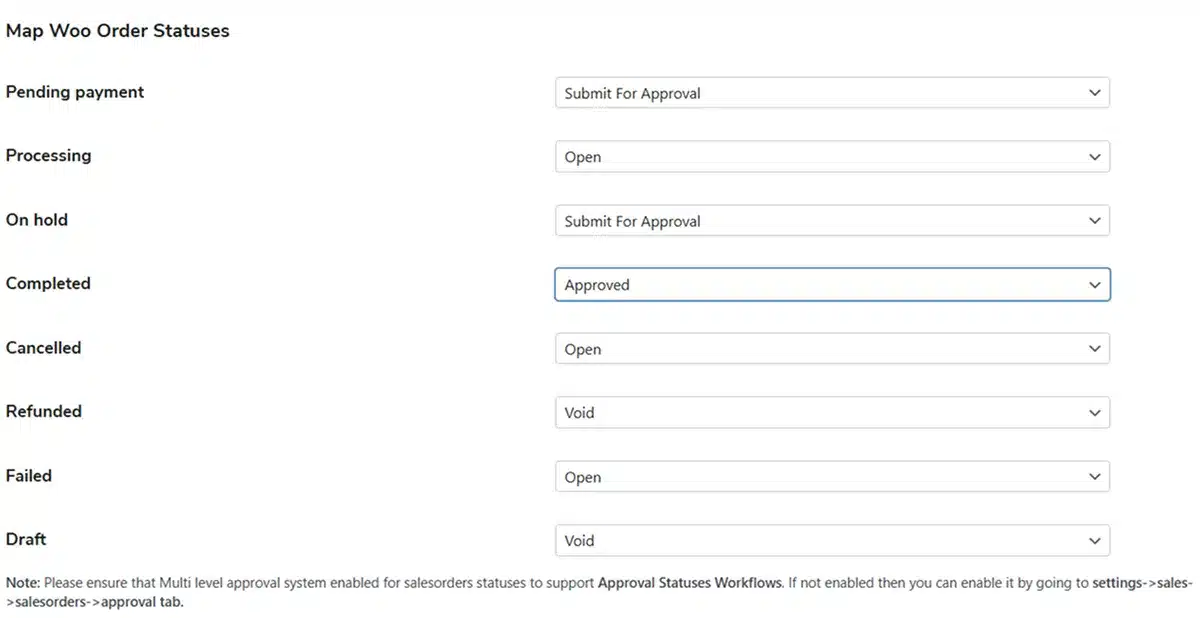
You can sync sales order statuses from WooCommerce to Zoho using the default sales order feed. Simply map the WooCommerce “Processing” status to “Submit for Approval” and the “Completed” status to “Approved.” You can also map these statuses as per your requirements. Once this mapping is done, whenever an order reaches these stages in WooCommerce, the same status will be automatically updated in Zoho.
-
Quotes (Estimates) Syncronization
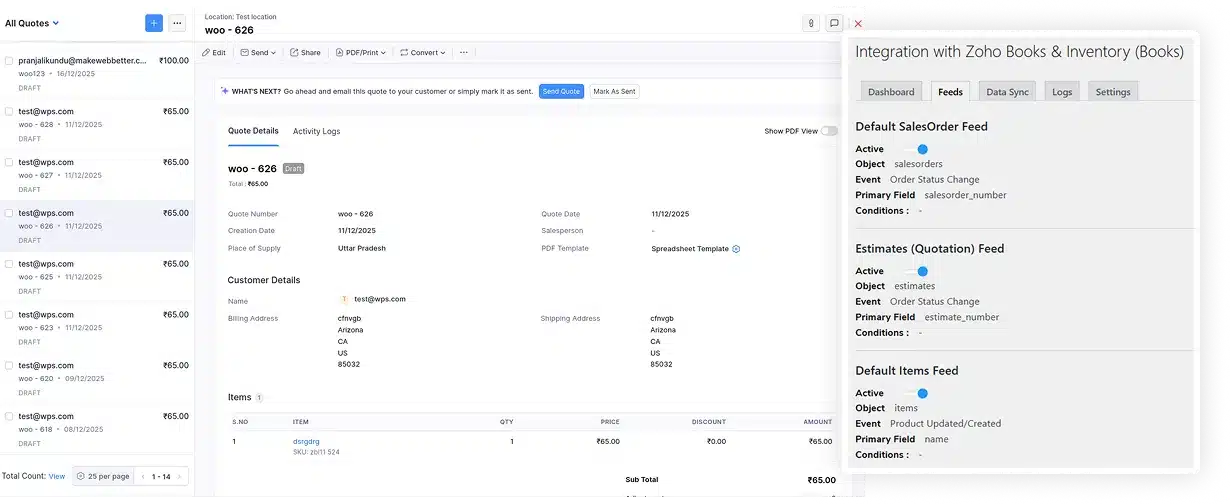
You can now also sync quotations (estimate pricing data) with Zoho Books. By creating a custom Estimate feed in your WooCommerce store, quotation details can be sent to Zoho when a customer purchases a product. After that, you can manage and update the quotation directly from the Zoho backend, and the changes will sync accordingly.
Note: Zoho Inventory does not support the Quotes feature.
-
Warehouse Syncing for Items, Orders, and Order-items
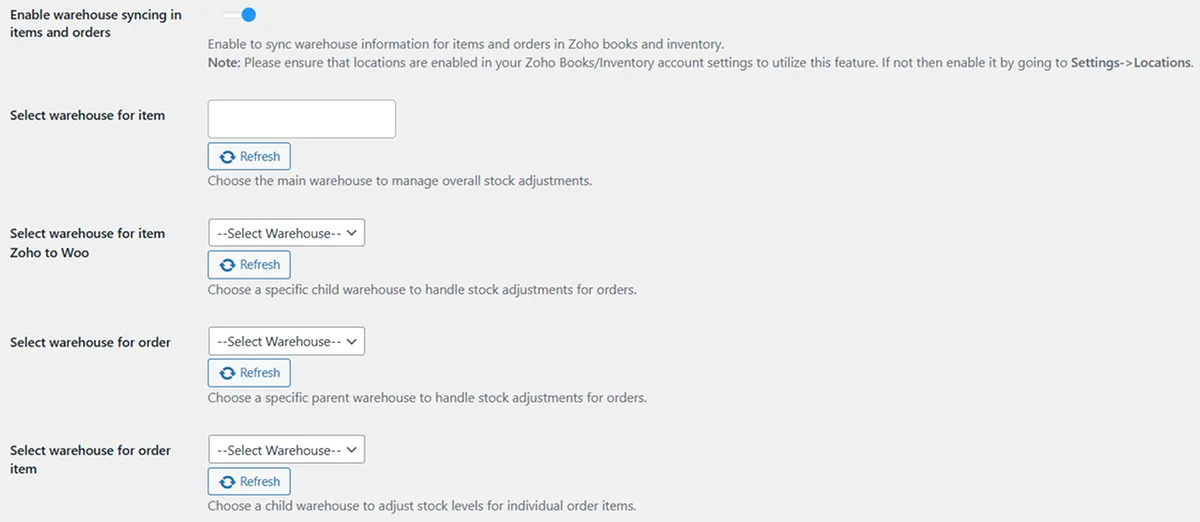
After you create both the parent and child warehouses in your Zoho dashboard, you can select them from the settings section of the plugin. You can choose whether orders and order items should be managed from the parent warehouse or the child warehouse. If the child warehouse is not set up or has not been defined, the plugin will automatically adjust the stock using the parent warehouse instead
Plugin Compatible With Us
Request Compatibility-
WooCommerce HPOS
The Zoho Books and Inventory integration is compatible with WooCommerce High Performance Order Storage (HPOS). This simple, solid database structure uses WooCommerce’s CRUD design to store orders in custom tables, handling instant and bulk orders smoothly for a better store workflow.

FAQs
- Default Contacts Feed
- Default Items Feed
- Default Invoice Feed



ReviewsReviews

$99.00/year

$89.00/year$99.00/year

$89.00/year

$129.00/year$149.00/year

$79.00/year$89.00/year




Reviews
There are no reviews yet.