

Integration with Zoho Books & Inventory
Zoho Books & Inventory Integration helps you connect your store to Zoho Books and Inventory and send your specified data to the modules for management. By default, you get 3 WooCommerce objects: products, contacts, and invoices that are available to sync your data. You can also create custom objects, our plugin works closely with Zoho Books. On top of that, our integration plugin offers bulk, one-click, and manual synchronization options to sync your WooCommerce data to Zoho Books and inventory effortlessly.
 Two-Way Sync
 Sync User IP and Browser Info
 Detailed Logs
 Sync Coupons Details
 Auto Sync in Background







Quick information
- Last Update: Sept 25, 2026
- Compatible up to: WP 7.1.x, WC 11.1.x
- Minimum PHP version: 7.4 or Higher
Overview
Our integration plugin easily connects your WooCommerce store with Zoho Books and inventory, starts syncing your store’s data, and manages it with ease.
-
New
 Two-Way Sync For Products
Our Zoho WooCommerce Integration helps you in syncing product stock quantities between Zoho and WooCommerce. Any changes in a product stock level in Zoho will be auto updated and reflected in your WooCommerce store.
-
One Click and Bulk Sync
Bulk Data Sync lets you sync all the WooCommerce objects of your site to Zoho in one step, and you can also choose to sync data within a custom date range and pause and resume the bulk sync process when required. On the other hand, One Click Sync option helps you sync all your site’s new or failed WooCommerce objects to Zoho in just one click.
-
Sync Tax and Shipping Tax Details
With our Books and Inventory Plugin, you can easily sync both shipping tax and shipping charges, cost details, and order tax, whether it is single or multiple taxes.
Please note: This feature is currently available only for US data center, with support to other countries coming soon.
-
Sync Coupon Details
WooCommerce Zoho books and inventory have the option to sync coupon details, which include the coupon code, amount, and type used by the customer during checkout. This feature is beneficial in keeping your accounting and inventory updated in real time.
-
Order Status Sync
Woocommerce books and inventory integration allows you to auto-sync the order status when it changes in your Woo store. This option is helpful in smooth order management and improves operational efficiency.
-
Auto Delete Logs
You have the option to set the specific number of days after the logs will be automatically deleted. This option is crucial for clearing up the space as the piled-up logs will unnecessarily increase load on your Books and inventory integration.
 Two-Way Sync For Products
 One Click and Bulk Sync
 Sync Tax and Shipping Tax Details
 Sync Coupon Details
 Order Status Sync
 Auto Delete Logs
Features
-
Sync Credit Notes on Refund
Keep your refund records in sync with Zoho. Whenever you issue a refund in WooCommerce, our Zoho Books and Inventory plugin automatically creates a matching credit note against the invoice in Zoho. You can also choose the Zoho bank or cash account used for the refund to keep your records accurate and organized.
Note: Credit Notes will only be generated when the order status is in Sent or Approved
-
Purchase Order Sync
Sync purchase orders from your WooCommerce store to Zoho with ease. Map important details such as Vendor ID, Purchase Order Number, and other fields, then trigger the synchronization automatically based on your selected event.
-
Sync Health Insights
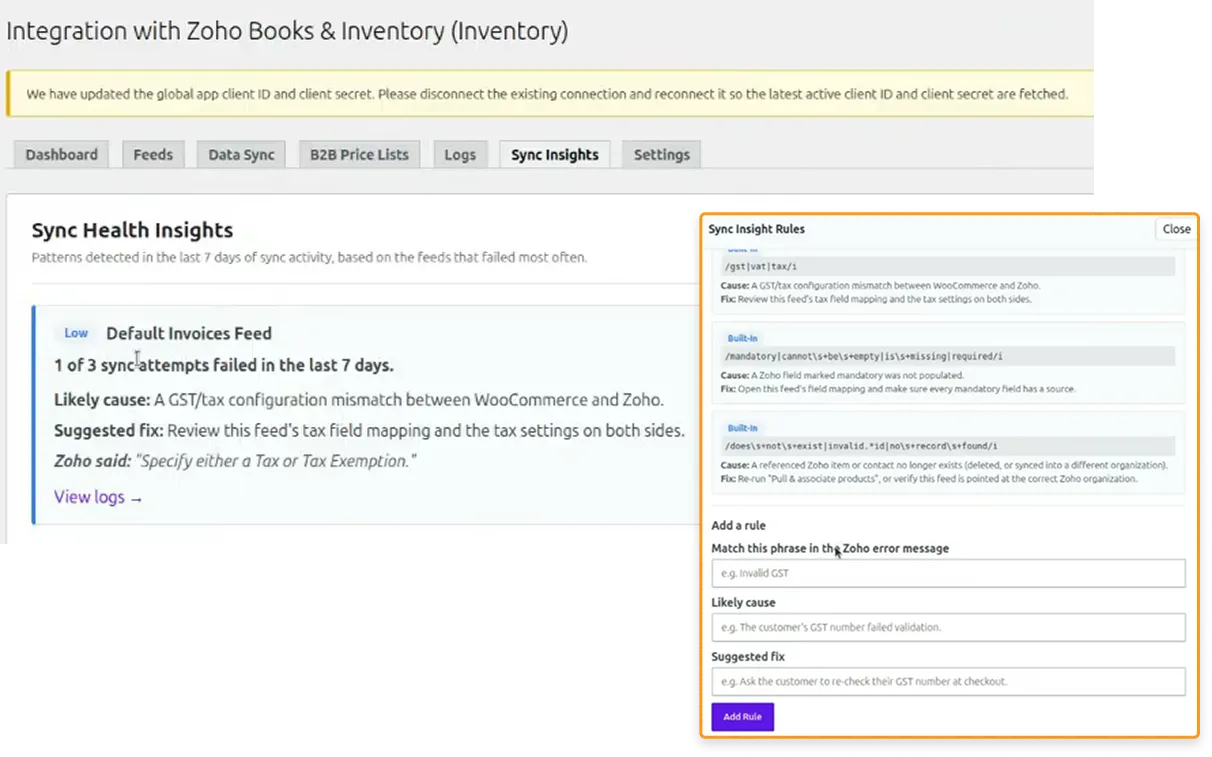
Zoho Books & Inventory Integration Plugin includes a powerful Sync Health Insights feature that helps you quickly identify synchronization issues and provides recommended fixes in real time. Instead of manually searching through logs to find errors and spending hours troubleshooting them, you can view the issue details and suggested resolutions from a single tab.
Sync Health Insights comes with a set of built-in rules that automatically detect common synchronization problems and recommend the appropriate fixes. For known issues, the system can instantly suggest proven solutions based on predefined rules. You can also create custom rules to address business-specific or site-specific sync challenges.
Plugin Compatible With Us
Request Compatibility-
WooCommerce HPOS
The Zoho Books and Inventory integration is compatible with WooCommerce High Performance Order Storage (HPOS). This simple, solid database structure uses WooCommerce’s CRUD design to store orders in custom tables, handling instant and bulk orders smoothly for a better store workflow. -
B2BKing
Zoho Books & Inventory Integration Plugin is compatible with B2BKing for wholesale price synchronization. You can create multiple price lists in Zoho and define different sales rates and custom prices for your products. Using our Zoho Books plugin, you can then map these Zoho price lists to specific B2BKing customer groups. This makes sure that the correct wholesale pricing is automatically synced and applied to the right customer group in your WooCommerce store. -
Wholesale Suit
Zoho Books & Inventory Integration Plugin is compatible with Wholesale Suite for wholesale price synchronization. You can create multiple price lists in Zoho and set different sales rates and custom prices for your products. After that, using our Zoho Books plugin, you can map these Zoho price lists to specific wholesale roles in Wholesale Suite. This way, you only have to manage the wholesale pricing over Zoho only, and it will get synced to your WooCommerce store automatically once mapped.


FAQs
- Default Contacts Feed
- Default Items Feed
- Default Invoice Feed



ReviewsReviews
1 review for Integration with Zoho Books & Inventory

$99.00/year

$89.00/year$99.00/year

$89.00/year

$129.00/year$149.00/year

$79.00/year$89.00/year




Luis –
All perfect with the plugin.
It works very well and the customer service is perfect!