

Integration For Bigin By Zoho CRM

Integration for Bigin by Zoho CRM plugin allows you to sync all your WooCommerce data, including customers, orders, and retail orders, to Bigin using simple one-click sync, or bulk sync, which helps you save your valuable time. This WooCommerce Bigin integration is flexible. It allows direct sync; the sync can operate in the background and allows the configuration to sync data based on conditional filters like AND & OR.
 Instant & Bulk Sync
 Detailed Sync Logs
 Conditional Filters For Sync
 Sync Based on Events
 Products Synchronization







-
Quick information
- Last Update: October 30, 2026
- Compatible up to: WP 7.1.x, WC 11.2.x
- Minimum PHP version: 7.4 or Higher
Overview
Sync your WooCommerce store’s data to Bigin with simple one-click or bulk options, saving you time and effort. Enjoy flexible sync controls, detailed logging, and custom data feeds to keep your CRM always accurate and up to date.
- New
 Background Sync
Background sync options are a miracle for your store, it auto-sync the data in the background every 5 minutes, saving your time by letting the process run smoothly in the background without interrupting your work.
-
Sync Contact Details
Send important customer information like name, email, phone number, and an address to bigin with just one click. This keeps the information organized in one place.
-
Sync Product Details
Sync product details like name, code, price description, and category fast and efficiently to ensure your Bigin records match your WooCommerce store.
-
Pipeline Synchronization
Maintain accurate pipeline data by syncing order status, quantity discounts, and more.
-
Sync Based on Conditional Filters
Set rules to control which data gets synced to Bigin using AND/OR filters. This gives you complete flexibility to manage data flow in a way that suits your business well.
-
Sync Log Section
Monitor every synchronization, with a dedicated detailed logs section highlighting the important information like objects and IDs, this way you can quickly spot and fix errors for reliable syncing.
 Background Sync
 Sync Contact Details
 Sync Product Details
 Pipeline Synchronization
 Sync Based on Conditional Filters
 Sync Log Section
Features
-
Bulk Sync Dry Run, Preview, and Data Validation
With our Bigin Integration plugin, you can run a dry run to preview records before bulk syncing them. Review record actions, identify data issues, and check how many records will be created, updated, or skipped, along with any errors and warnings. Once you’ve reviewed the results, click Confirm and Start Sync to begin syncing your data.
-
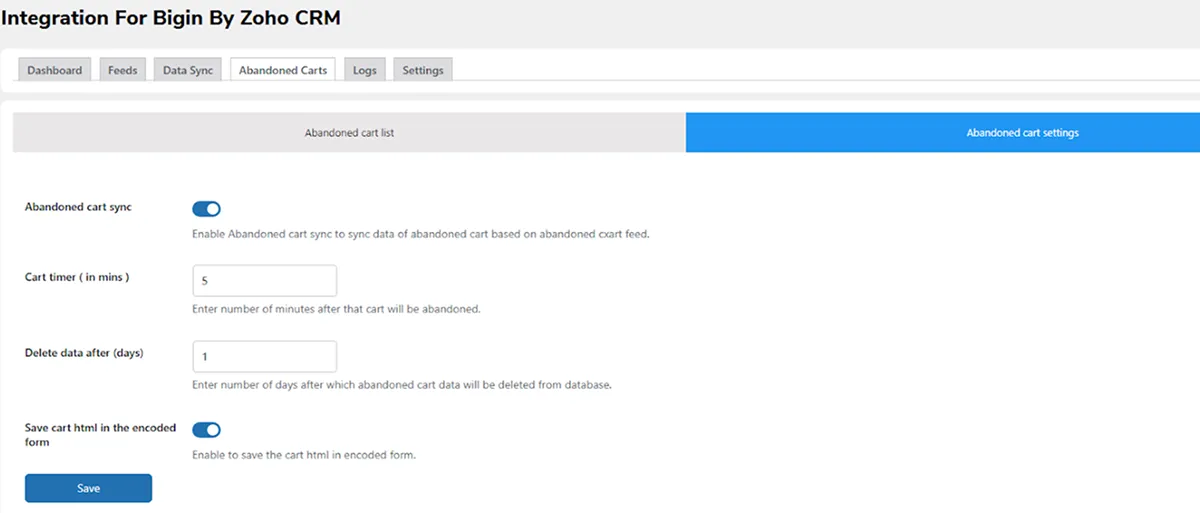
Sync Abandoned Cart Details
You can sync abandoned cart data of both guests with our bigin integration plugin. This feature can be turned on or off anytime. You also have the option to define the cart abandonment time, automatically remove abandoned cart records from your store after a set duration, and save the data in an HTML-encoded format for better security and compatibility.
-
Two-Way Pipeline Stages Synchronization
With the latest update to our Zoho Bigin plugin for WooCommerce, the pipeline stages now sync in both way. For example, if your “Qualification” stage in Bigin is linked to the “On Hold” status in WooCommerce, moving an order to the “Qualification” stage in Bigin will automatically update it to “On Hold” in WooCommerce. The same happens the other way around, keeping both platforms perfectly in sync.


Plugin Compatible With Us
Request Compatibility-
WooCommerce HPOS
The Integration For Bigin By Zoho CRM is compatible with WooCommerce High Performance Order Storage (HPOS). This simple, solid database structure uses WooCommerce’s CRUD design to store orders in custom tables, handling instant and bulk orders smoothly for a better store workflow.

FAQs


ReviewsReviews

$99.00/year

$89.00/year$99.00/year

$89.00/year

$129.00/year$149.00/year

$79.00/year$89.00/year




Reviews
There are no reviews yet.