


Choosing between WordPress.com vs WordPress.org can be confusing, especially for beginners starting their first website, blog, or online store.
Both platforms are built on WordPress, but they work differently. One gives you an easy, managed setup, while the other gives you full control and flexibility over your website.
Your choice can affect your website’s customization, SEO, monetization, maintenance, and long-term growth.
In this guide, we will compare WordPress.com vs WordPress.org based on pricing, features, security, storage, customization, and eCommerce support, so you can choose the right platform for your needs in 2026.
In A Hurry? Here’s A Brief Summary…
- WordPress.com is easier for beginners and handles hosting, security, and maintenance.
- WordPress.org gives full control over customization, SEO, and monetization.
- WordPress.com has limitations on plugins and advanced features in lower plans.
- WordPress.org is better for WooCommerce stores and scalable business websites.
- SEO flexibility is stronger on WordPress.org with advanced plugins and optimization tools.
- WordPress.org requires separate hosting, backups, and website management.
- Choose WordPress.com for simplicity and WordPress.org for long-term growth and flexibility.
WordPress.com vs WordPress.org: Quick Comparison
Before choosing between WordPress.com vs WordPress.org, it is important to understand how both platforms differ in terms of flexibility, pricing, customization, and website ownership.
WordPress.com is easier to start with and handles hosting and maintenance for you. On the other hand, WordPress.org gives you complete control over your website, plugins, themes, SEO, and monetization options.
| Feature | WordPress.com | WordPress.org |
|---|---|---|
| Hosting | Included | Self-hosted |
| Custom Themes & Plugins | Limited | Full Access |
| Website Control | Limited | Complete Control |
| Monetization | Restricted | No Restrictions |
| SEO Flexibility | Limited | Advanced SEO Control |
| eCommerce Support | Available on Higher Plans | Fully Supported |
| Best For | Beginners & Hobby Blogs | Businesses & Online Stores |
| Maintenance | Managed by WordPress.com | Managed by You |
If you want simplicity and minimal maintenance, WordPress.com can be a good starting point. But if you need full customization, advanced SEO features, WooCommerce support, and better scalability, WordPress.org is usually the better option.
Difference Between WordPress.org vs WordPress.com
Although both platforms are built on WordPress, they are designed for different types of users and website goals.
WordPress.com is a hosted platform that manages hosting, maintenance, backups, and security for you. It is easier for beginners who want to quickly start a blog or a simple website without handling technical tasks.
However, the free and lower pricing plans come with limitations on customization, plugins, monetization, and advanced SEO features.
WordPress.org is a self-hosted platform that gives you complete control over your website. You can install any plugin or theme, customize your website freely, run ads, improve SEO, and build fully functional eCommerce stores using WooCommerce.
Many businesses, online stores, and growing brands prefer WordPress.org because of its flexibility, scalability, and ownership benefits.
Looking for Powerful WooCommerce Plugins?
1. Pricing Difference
Pricing is one of the biggest differences between WordPress.com vs WordPress.org.
While WordPress.com offers managed plans with hosting included, WordPress.org gives you the freedom to choose your own hosting provider and website setup based on your budget and business needs.
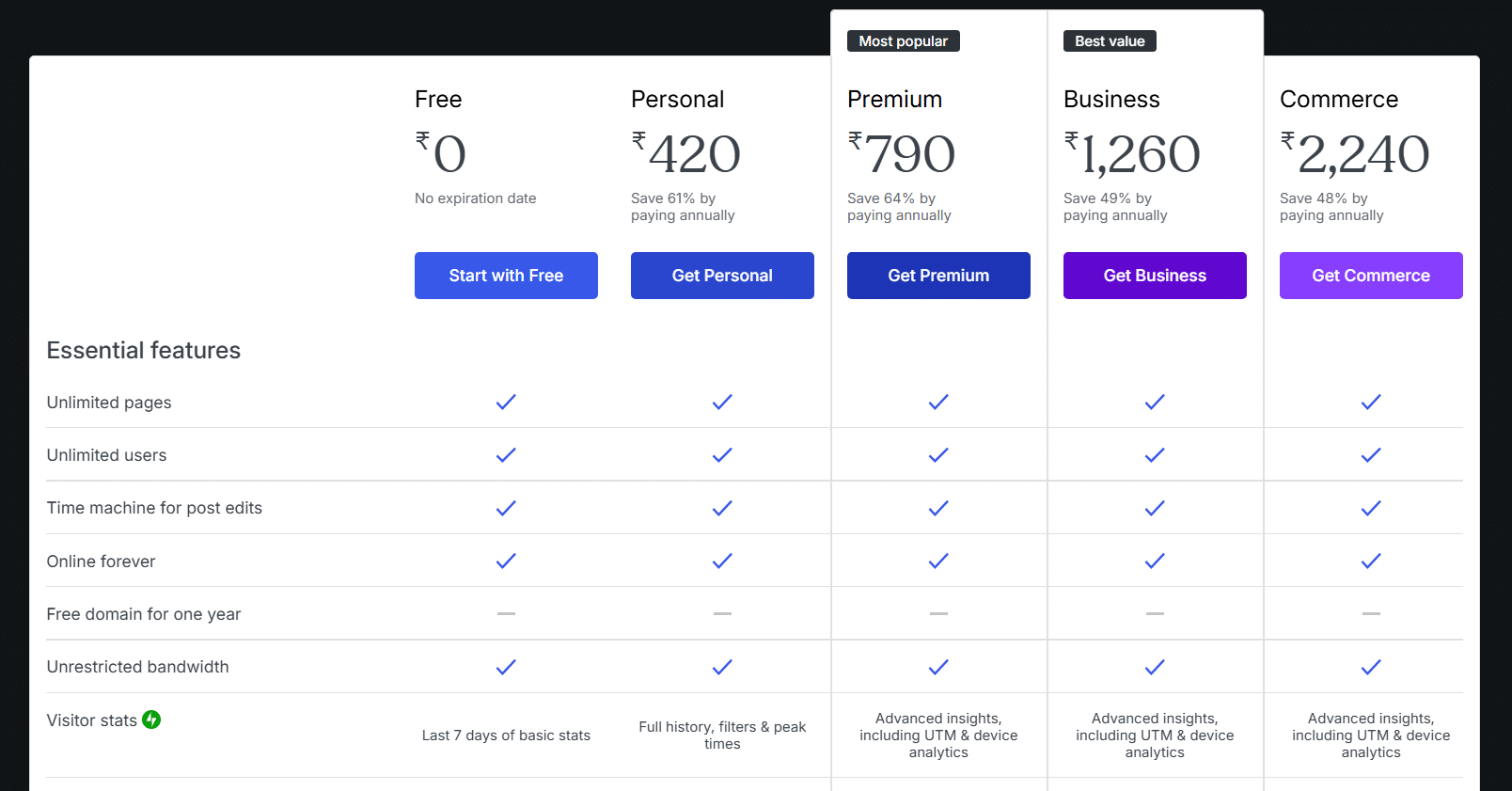
WordPress.com
If you choose the free WordPress.com plan, you will get limited storage and a WordPress-branded domain. WordPress.com also displays ads on free websites.
[Image Source: WordPress.com]
WordPress.org
WordPress.org is free to use, but you need your own hosting and domain name to make your website live.
Many hosting providers offer one-click WordPress installation, free SSL certificates, backups, and website security features.
Your total cost depends on the hosting provider, domain name, and extra tools you choose for your website.
| WordPress.com | WordPress.org |
|---|---|
| Hosting is included. | You need to purchase hosting. |
| Free plan available. | Software is free, but hosting and domain cost extra. |
| Limited flexibility on lower plans. | Complete flexibility and ownership. |
| WordPress branding on free plans. | No forced branding or ads. |
| Best for simple websites and blogs. | Best for scalable websites and online stores. |
Want to Start a WooCommerce Subscription Business?
2. Functionality Difference
The functionality you need depends on the type of website you want to build. WordPress.com is easier for beginners who want a simple website without handling technical tasks. WordPress.org gives you more control, customization, and advanced features, making it a better choice for business websites.
WordPress.com
WordPress.com is designed for users who want a simpler website setup without managing hosting, updates, or technical maintenance.
It works well for personal blogs, hobby websites, portfolios, and small websites. However, customization and advanced features are limited on lower-tier plans.
Some features require higher pricing plans, including:
- Custom themes
- Plugin installation
- Advanced SEO tools
- eCommerce functionality
- Payment integrations
- Advanced customization
WordPress.org
WordPress.org gives you complete freedom to customize and grow your website based on your business needs.
You can install custom themes, upload plugins, improve SEO, integrate payment gateways, run ads, and build scalable WooCommerce stores without platform restrictions.
It is widely used for:
- WooCommerce stores
- Membership websites
- Subscription businesses
- Business websites
- Agency websites
- SEO-focused blogs
- Learning platforms
| WordPress.com | WordPress.org |
|---|---|
| Limited customization on lower plans. | Full website customization. |
| Restricted plugin support. | Install any plugin you want. |
| Limited monetization options. | Unlimited monetization options. |
| Better for basic websites. | Better for scalable businesses. |
| Limited SEO flexibility. | Advanced SEO control. |
3. Storage Difference
Storage is another important factor when comparing WordPress.com vs WordPress.org.
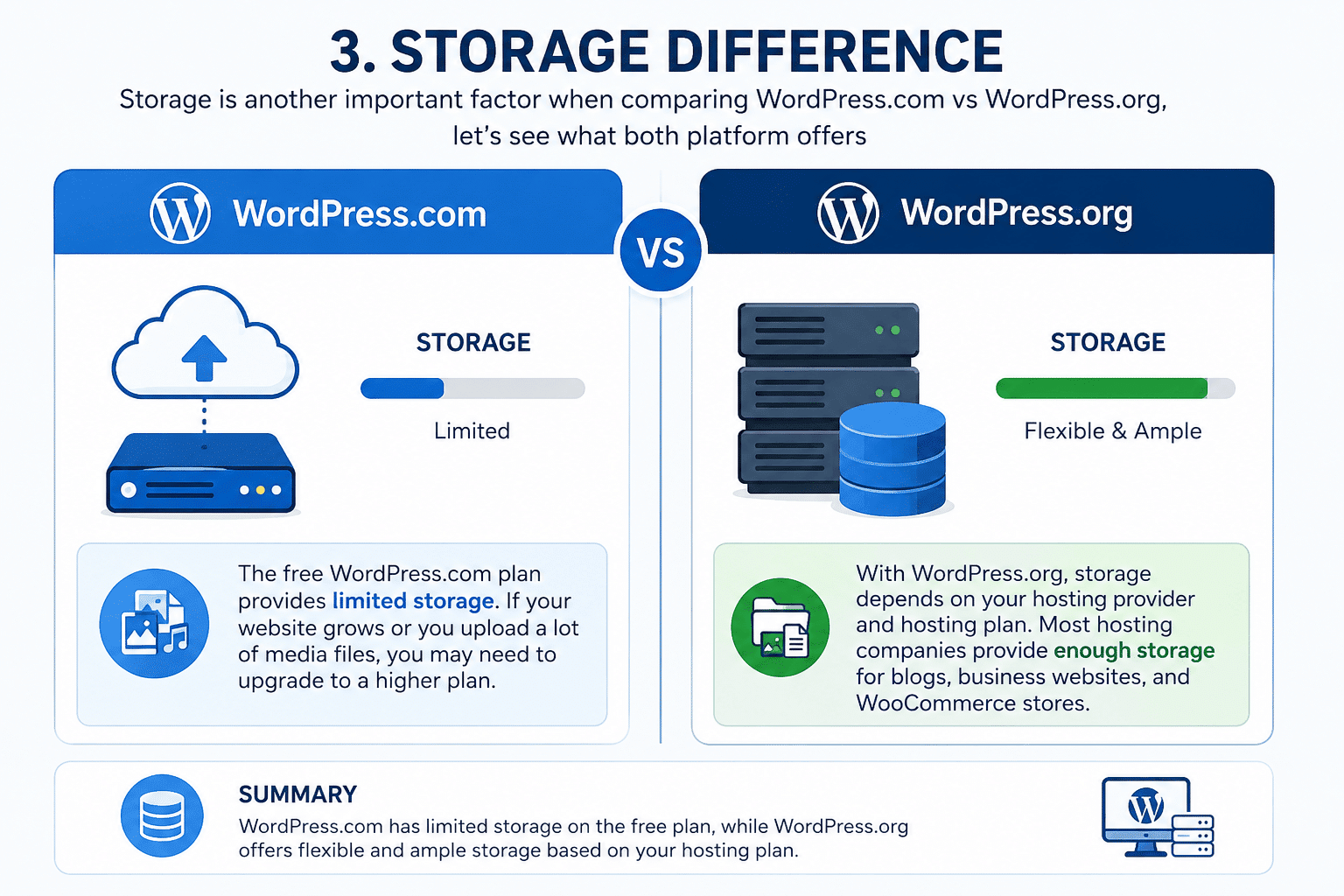
Let’s see what both platform offers.
WordPress.com
The free WordPress.com plan provides limited storage. If your website grows or you upload a lot of media files, you may need to upgrade to a higher plan.
WordPress.org
With WordPress.org, storage depends on your hosting provider and hosting plan. Most hosting companies provide enough storage for blogs, business websites, and WooCommerce stores.
4. Maintenance And Security
Maintenance and security are important when choosing a website platform. WordPress.com handles updates, backups, and security automatically, while WordPress.org gives you full control.
WordPress.com
WordPress.com manages website maintenance, backups, updates, and security services for you. This makes it easier for beginners who do not want to handle technical tasks.
WordPress.org
With WordPress.org, you are responsible for website maintenance, security, and backups.
However, you also get complete control over how your website is secured and optimized. You can install security plugins, backup tools, caching plugins, and performance optimization tools based on your needs.
| WordPress.com | WordPress.org |
|---|---|
| Maintenance handled for you. | You manage maintenance and updates. |
| Security is handled by the platform. | You control website security. |
| Automatic backups. | Backup plugins may be needed. |
| Easier for beginners. | Better flexibility and control. |
Pros And Cons: WordPress.com Vs WordPress.org
WordPress.com
| Pros | Cons |
|---|---|
| Easy setup process | Limited customization |
| Hosting included | Restricted plugins on lower plans |
| Automatic maintenance | Limited monetization |
| Beginner friendly | WordPress branding on free plans |
| Good for hobby blogs | Limited SEO flexibility |
WordPress.org
| Pros | Cons |
|---|---|
| Full website ownership | Requires hosting and domain |
| Complete customization | Maintenance is your responsibility |
| Better SEO flexibility | Slight learning curve for beginners |
| Unlimited monetization | Need to manage backups and security |
| Best for WooCommerce and business websites |
What Will You Need To Run WordPress.com Or WordPress.org Website?
If you choose WordPress.com, most things are already included in your plan, including hosting and maintenance.
If you choose WordPress.org, you will usually need:
- Hosting plan
- Domain name
- SSL certificate
- Backup solution
- Security plugin
Although WordPress.org requires more setup, it offers better flexibility, customization, and long-term scalability.
When To Choose Between WordPress.com & WordPress.org?
The right platform depends on your website goals, technical comfort, and future plans. WordPress.com is better for simple websites and beginners, while WordPress.org is ideal for businesses.
Choose WordPress.com If:
- You are starting a personal blog
- You want a simple setup
- You do not want technical maintenance
- You need a basic website quickly
Choose WordPress.org If:
- You want full control over your website
- You plan to build an online store
- You need advanced SEO features
- You want complete customization
- You want to scale your website in the future
- You want better monetization options
Need Help Setting Up a WooCommerce Store?
Which Platform Is Better for SEO and eCommerce?
If SEO, content growth, and online selling are important for your business, WordPress.org offers more flexibility and control.
With WordPress.org, you can install SEO plugins like Yoast SEO or Rank Math, optimize website performance, add schema markup, improve page speed, and fully customize your website structure.
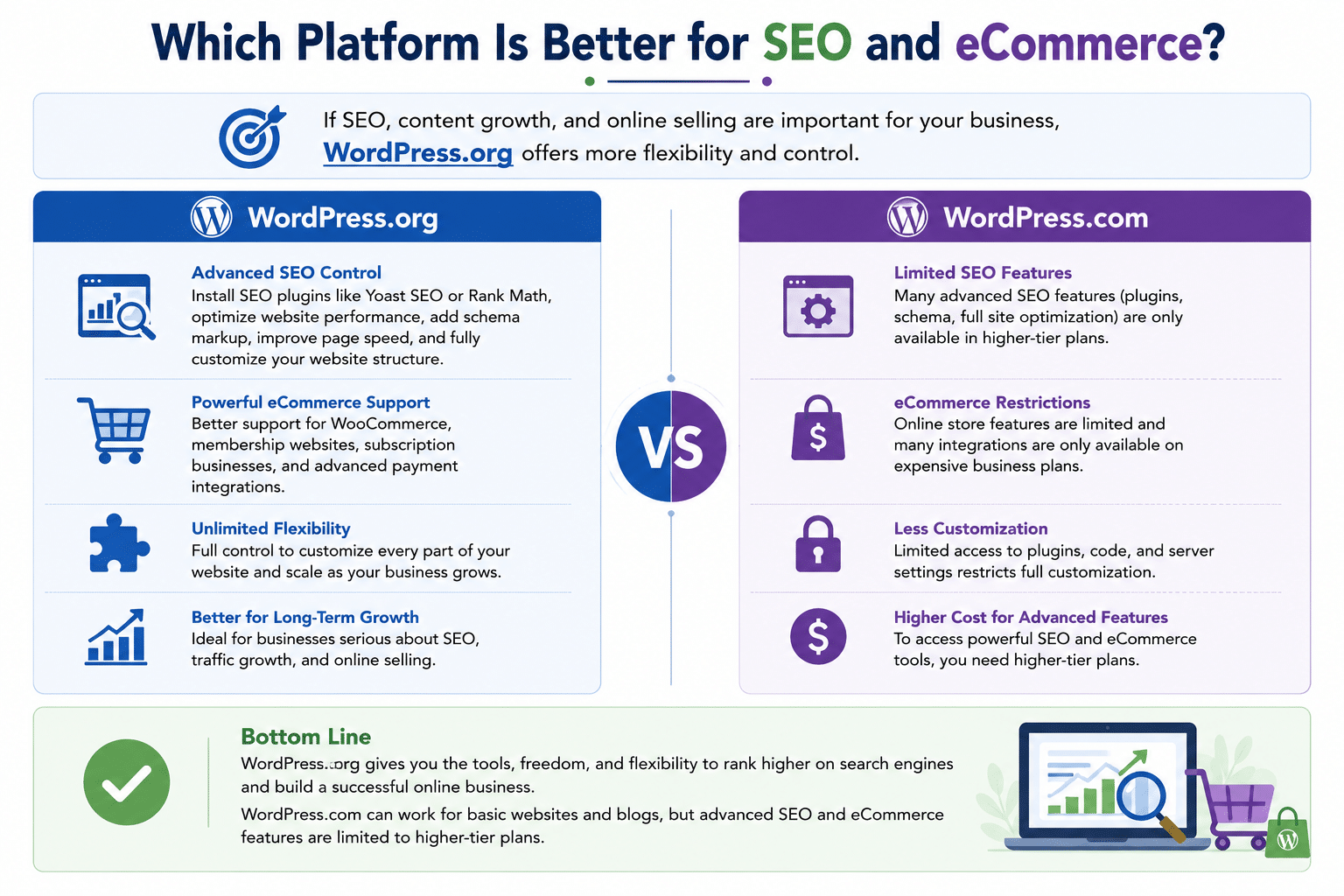
It also provides better support for WooCommerce, membership websites, subscription businesses, and advanced payment integrations.
WordPress.com can still work for basic websites and blogs, but many advanced SEO and eCommerce features are only available in higher-tier plans.
Can You Migrate From WordPress.com To WordPress.org?
Yes, you can migrate your website from WordPress.com to WordPress.org.
Many users start with WordPress.com and later switch to WordPress.org when they need more flexibility, plugin support, advanced SEO tools, or WooCommerce features.
During migration, you can transfer:
- Blog posts
- Pages
- Images
- Media files
- Website content
It is also important to properly manage redirects and SEO settings during migration to avoid losing search rankings.
Our Recommendation
Both WordPress.com and WordPress.org are valuable platforms, but the best choice depends on your goals. WordPress.com is ideal if you want simplicity, managed hosting, and a personal or hobby blog without the need for technical management.
On the other hand, WordPress.org is better suited for those seeking complete ownership, advanced customization, greater SEO flexibility, and the ability to build a WooCommerce store or scale their website over the long term.
In our experience, WordPress.org is generally the preferred option for businesses, online stores, and brands aiming for long-term growth and flexibility.
FAQs About WordPress.com Vs WordPress.org
1. What is the main difference between WordPress.com and WordPress.org?
WordPress.com is a hosted platform that manages hosting and maintenance for you. WordPress.org is self-hosted and gives you complete control over your website.
2. Which is better for SEO?
WordPress.org is generally better for SEO because it allows advanced SEO plugins, schema customization, performance optimization, and full website control.
3. Which platform is better for WooCommerce?
WordPress.org is better for WooCommerce because it supports complete eCommerce customization, plugins, payment gateways, and scalability.
4. Can beginners use WordPress.org?
Yes, beginners can use WordPress.org. Many hosting providers offer one-click WordPress installation and beginner-friendly dashboards.
5. Can I switch from WordPress.com to WordPress.org later?
Yes, you can migrate from WordPress.com to WordPress.org whenever you need more flexibility and customization.
6. Is WordPress.com free?
Yes, WordPress.com offers a free plan, but it comes with limitations like WordPress branding, limited customization, and restricted monetization.
7. Do I need hosting for WordPress.org?
Yes, WordPress.org requires a hosting provider and a domain name to make your website live.
8. Which platform is better for businesses?
WordPress.org is usually better for businesses because it offers full ownership, scalability, advanced SEO, and better eCommerce support.
9. Can I use WordPress.org without hosting?
No, WordPress.org requires hosting and a domain name to make your website live on the internet. Since it is a self-hosted platform, you need a hosting provider to store your website files and manage your website online.
10. Is WordPress.org cheaper?
WordPress.org itself is free, but you need to pay for hosting, a domain name, and optional premium tools. In many cases, it can still be more cost-effective in the long run because you get complete ownership and flexibility without platform restrictions.
Conclusion
WordPress.com and WordPress.org both serve different types of users.
If you want a simple blogging experience with minimal maintenance, WordPress.com is easier to start with.
But if you want full ownership, better SEO control, WooCommerce support, advanced customization, and long-term scalability, WordPress.org is usually the better investment.
Your final choice should depend on your goals, technical comfort level, and how much control you want over your website.
About the Author: Mohd Talib







Thank you for appreciation. Keep engaged with us.
Hi there, You’ve done a fantastic job. I’ll definitely digg
it and personally suggest to my friends. I’m sure they
will be benefited from this web site.