


You can not afford to waste even a single second on the internet; speed matters when it comes to owning a WooCommerce store. If your website is stagnant and forces your customers to wait, you will have to face the negative impact immediately. You can notice an increase in the bounce rate, poor search rankings, and decreased conversions. This is why W00C0mmerce Speed Optimization is so crucial.
Yes, WooCommerce is a versatile eCommerce solution. That said, there is a well-known misconception about it being inherently slow. The reality is quite different. Speed issues occur when site configurations are suboptimal, hosting environments are unstable, or images or plugins are the main culprits.
In A Hurry? Here’s A Brief Summary…
- Around 53% of mobile users abandon a WooCommerce site if it takes longer than 3 seconds to load.
- Even a tiny 100-millisecond delay can negatively impact user conversion rates by 7%.
- Moving from a shared hosting environment to managed or cloud-based WooCommerce hosting makes your store load 2 to 5 times faster.
- Building your store with a well-coded custom theme instead of a generic page builder can reduce the site’s overall file size by 40% to 60%.
- For a WooCommerce store making ₹1,00,000 per day, a 1-second delay can cost up to ₹25,00,000 in lost sales every year.
- No amount of optimization plugins can fix a cheap, shared hosting plan.
- Unoptimized images account for over 50% of an average web page’s weight.
- Slow mobile speeds directly drop your organic search rankings. Google uses Core Web Vitals as an official ranking factor.
Fortunately, you have too many solutions to tackle this problem. WooCommerce, as a platform, offers several options to optimize your site and make it faster and more responsive. Faster websites improve user experience, increase website traffic, and help with SEO.
In This Blog, We Will Talk About…
(Jump to the section that interests you the most!)
What Slows Down A WooCommerce Store’s Speed?
A slow WooCommerce website doesn’t happen by mistake. As your store grows, many factors can quietly impact the performance, leading to longer load times and loss of conversions & sales.
Some of the common causes of What Slows Down A WooCommerce Store’s Speed are –
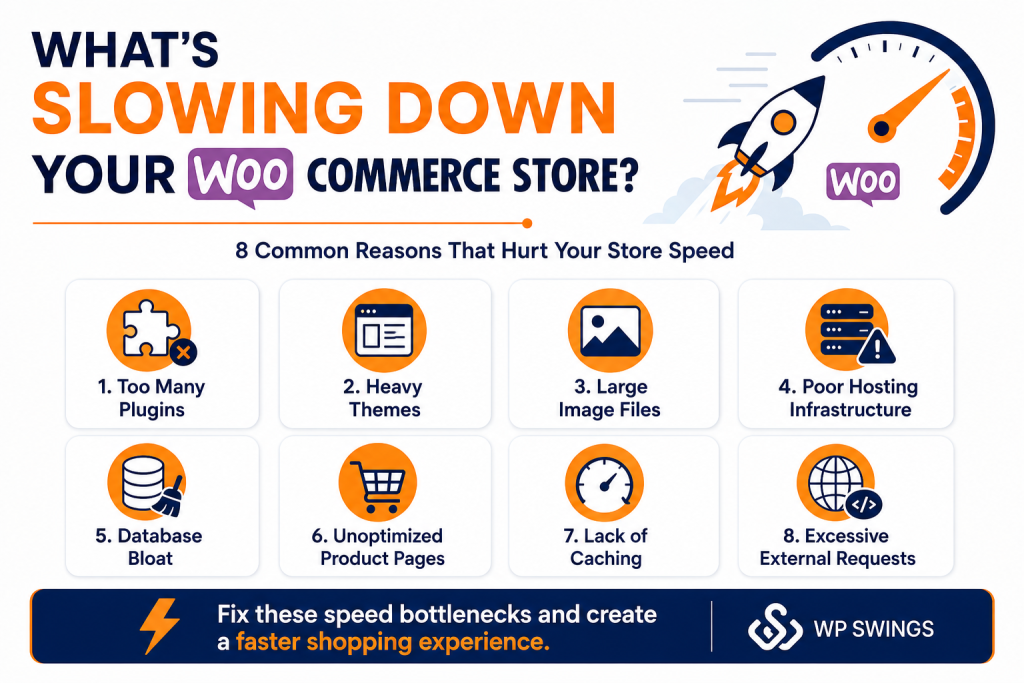
- Installing Too Many Plugins: This is one of the most common mistakes that impacts the speed of your WooCommerce store. Poorly optimized or excessive plugins for a single job can increase database load because of multiple server requests.
- Huge Media Files: Uploading raw, unoptimized directly from the camera roll adds massive page weight.
- Excessive External Requests: External APIs, third-party payment gateways and shipping calculators that communicate synchronously block page rendering until they finish loading.
- Database Bloat: Did you know that running more than 30 plugins triggers a massive influx of script requests, which is the leading cause of database bloat.
- Heavy Themes: Feature-packed themes with unnecessary scripts and animations often slow down page rendering.
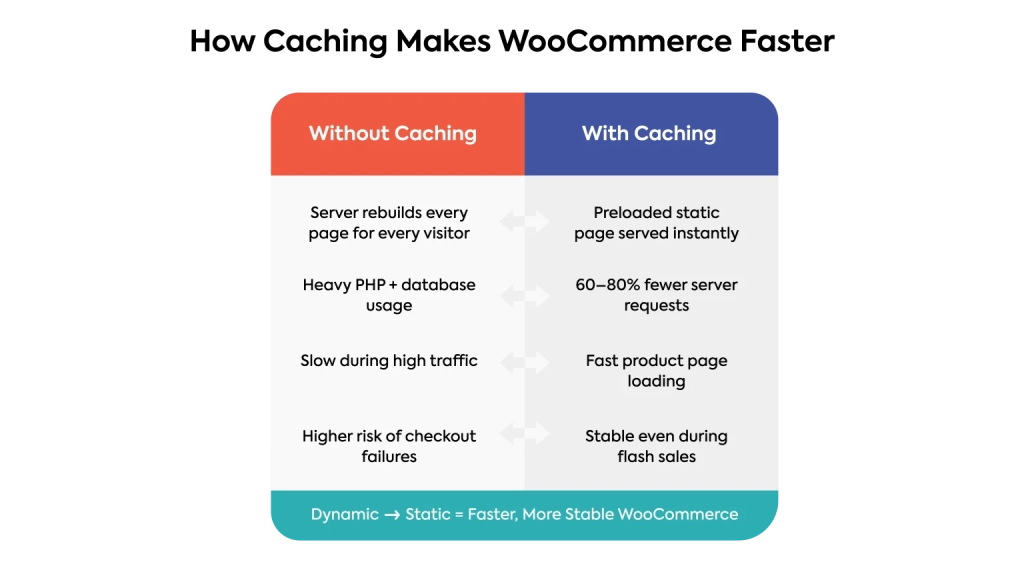
- Lack of Caching: Without caching, the server must generate pages from scratch for every visitor.
- Unoptimized Product Pages: When WooCommerce store owners use large PNG or JPEG files instead of next-gen, high-compression formats like WebP or AVIF, they experience site rendering delays.
Understanding the root causes of what is slowing down your WooCommerce store is essential. Now that our readers are familiar with the causes, we can proceed to actionable strategies for WooCommerce Speed Optimization.
8 Proven Ways To Help With WooCommerce Speed Optimization
A study shows that a one-second delay in site loading can impact 20% of the overall conversions in retail. Apart from this, web page loading time is also a confirmed ranking factor. Here are 8 proven ways to help with WooCommerce Speed Optimization of your site.
We suggest implementing all these at once to experience quick results. But if you’re short on time or managing multiple client sites, a smart move is to use a site management platform with built-in tools like a performance scanner, one-click optimization, and version control to keep every site running at peak performance without switching tabs or juggling multiple plugins.
Let’s dive right into the ways to improve WooCommerce Speed Optimization –
1. Choosing a Hosting Provider Optimised For WooCommerce
Hosting is where your WooCommerce store exists. Your house furniture is like a website, and your house is like a host. If your house is not built on a good foundation, then your furniture could fall right through the floor.
Choosing the right hosting plan is one of the first and most important steps in WooCommerce Speed Optimization.
It might seem a good idea to choose a hosting provider with unlimited bandwidth and space for emails, domains, and more. What we fail to understand regarding this offer is that shared hosting fails to deliver good loading times for a large audience.
There are many hosting providers in the market; it is very easy to get confused, especially when the sole purpose is WooCommerce Speed Optimization. Some of the best hosting providers for WooCommerce websites are –
Source: MilesWeb
2. Optimize All Product Images & Store Visuals
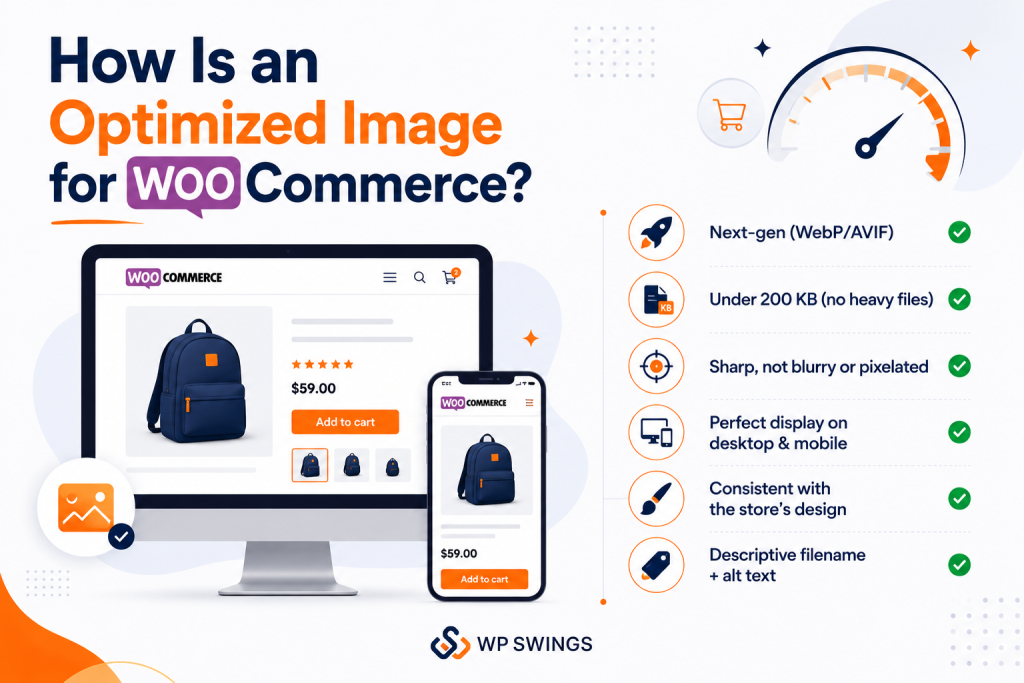
Visuals such as product images, videos, and infographics are usually one of the main culprits behind slow site loading. So, your priority should be to optimize them without compromising on the overall quality. Doing so will dramatically boost the overall speed, thereby helping with WooCommerce Speed Optimization.
Now, you may be wondering how to optimize effectively.
Here is the approach. First, compress all the images by reducing each image size to a few KB, but make sure that the quality (in terms of resolution) remains unchanged. A digital marketing agency can further optimize website performance by implementing advanced image optimization and speed enhancement techniques.
There are numerous tools available that can prove beneficial, such as TinyPNG for image compression and Upscale Pro for enhancing image quality. If you have a WooCommerce store, specialized plugins like Imagify will automate the process. Moreover, use modern image formats such as WebP, AVIF, etc. These offer excellent compression as compared to JPG or PNG. A PNG to WebP converter can help you quickly convert your images without losing quality.
When it comes to videos, ideally, you should also compress them while retaining the quality. At the time of uploading, it’s better to embed them into the webpage via a link rather than upload from local storage.
3. Always Keep Your Plugins and Theme Updated
These days, the majority of people are very cautious about software and device updates. We understand that it’s easy to become numb to those messages, especially when the results of the required updates are so often invisible to the typical user.
However, when it involves WooCommerce, you ought to always update every aspect of your site as soon as possible.
It’s essential not to ignore updates once they become available, whether they’re core updates for your WooCommerce installation or new versions of your theme or plugins. The most important reason for this is security, as new updates will make sure that your site is safe against the latest threats and help with WooCommerce speed optimization.
4. Delete Unused Themes and Plugins
As you already know, choosing the best theme and plugins and keeping them updated is the best method to gear up your WooCommerce store.
Another thing to note while you proceed with WooCommerce speed optimization is to delete unused themes and plugins. This is the site maintenance task that you should perform regularly. Because themes and plugins that are not active on your site will take up some space on your server. Keeping unnecessary content around can confuse administrators and audiences.
There are two principles you should take into account:
- Do not activate the plugins that are of no use.
- You should be very careful while installing plugins because some plugins are bloated with unnecessary scripts.
5. Use Lazy Loading If Needed
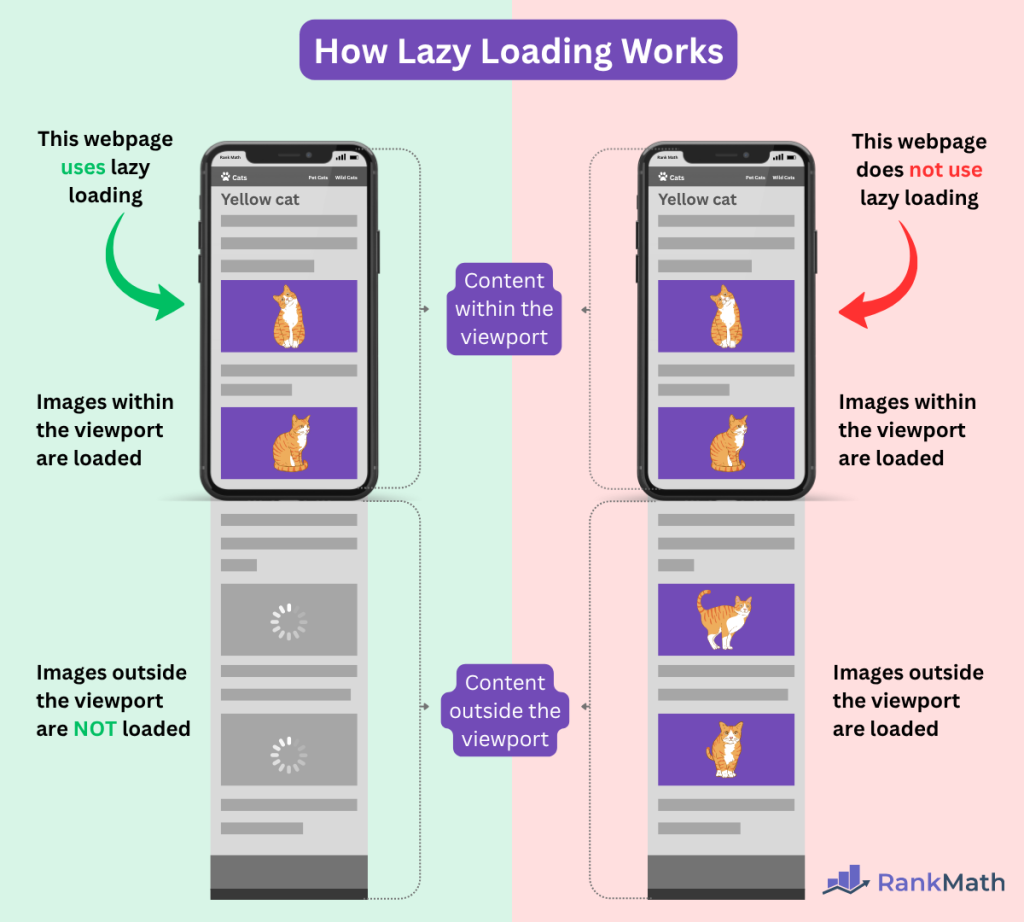
Before you proceed with implementing this proven way to help with WooCommerce speed optimization, let’s understand how this works –
Source: RankMath
To enhance WooCommerce speed optimization, this HTML attribute is used. After implementing lazy loading on your webpage, it delays the loading of elements such as images or videos until they are needed.
Firstly, for this HTML attribute to work, you must include the “src” attribute for the lazily loaded web page resources (all media, including images, videos, GIFs, etc). After this, it analyzes the visitors’ scroll position on a page using JavaScript.
As the user reaches the reference object, the lazy load replaces the reference src attribute with the actual src and loads the content.
6. Reduce Server Response Time
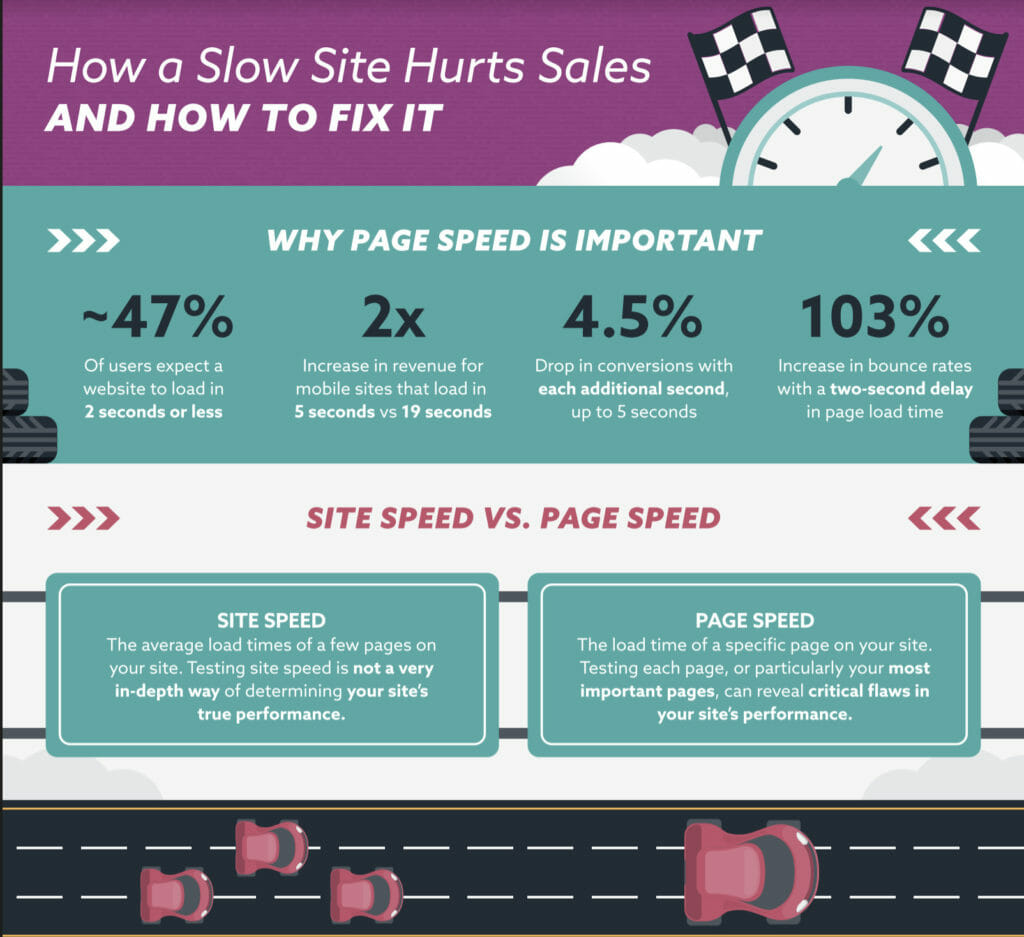
Slow server response affects performance. Hence, you need to understand how fast your website is loading because it has a direct impact on the traffic of your site. The faster the loading time, the more the audience will engage on your site. As we all know, page loading time and server response time are important factors that will help your site to rank on the first page.
Source: CXL
To improve website speed optimization, it is very important to reduce the server response time because if you do not reduce the response time, your site may take more time to load, which results in an increased bounce rate, i.e., the audience will simply leave your site before your site even finishes loading.
Google PageSpeed Insights recommends that TTFB (Time to First Byte) should be less than 200ms as a good server response time. TTFB, which stands for Time to First Byte, is a measurement of how much time the browser takes before receiving its first byte of data from the server. The longer time it takes to fetch that data, the longer time it takes to display it on your page. You can use various tools to check this. I have taken the result of the WP Swings website in the TTFB testing tools.
7. Use A CDN Network
Last but not least, using a CDN network can also help improve the website’s loading speed. A CDN helps store different copies of your web content across different global network servers.
So, whenever a user approaches your website, the CDN will identify its location and then connect it with the nearby server. This strategy ultimately results in enhancing the loading speed. Apart from this, a CDN also distributes the traffic across different servers, which can be really useful for high-traffic websites.
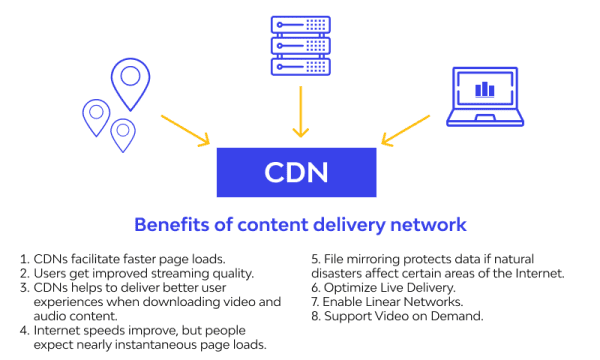
Let us take an example: Suppose the user visits your website, and their request is redirected to the main server. It means every user who is visiting your site is redirected to the main server. Hence, if multiple users try to visit the site at the same time, it results in server overloading and slows your website speed. So, this problem can be solved by CDN.
8. Caching
Most of you will already be aware of this – caching allows different sections of your site to be stored temporarily in users’/visitors’ local storage. So that users don’t have to reload all the elements or the page whenever they revisit after some time.
Source: Smackcoders
This technique will not only prove beneficial in improving website speed but also the overall user experience. There are multiple things that you need to do to enable caching. First of all, you should set expiration dates along with the minimum age in the HTTP headers for static resources. Doing so will tell the browser to reuse previously fetched sources such as logos, stylesheets, and many more.
Additionally, implement page caching. This is because it saves fully rendered HTML pages for fast loading.
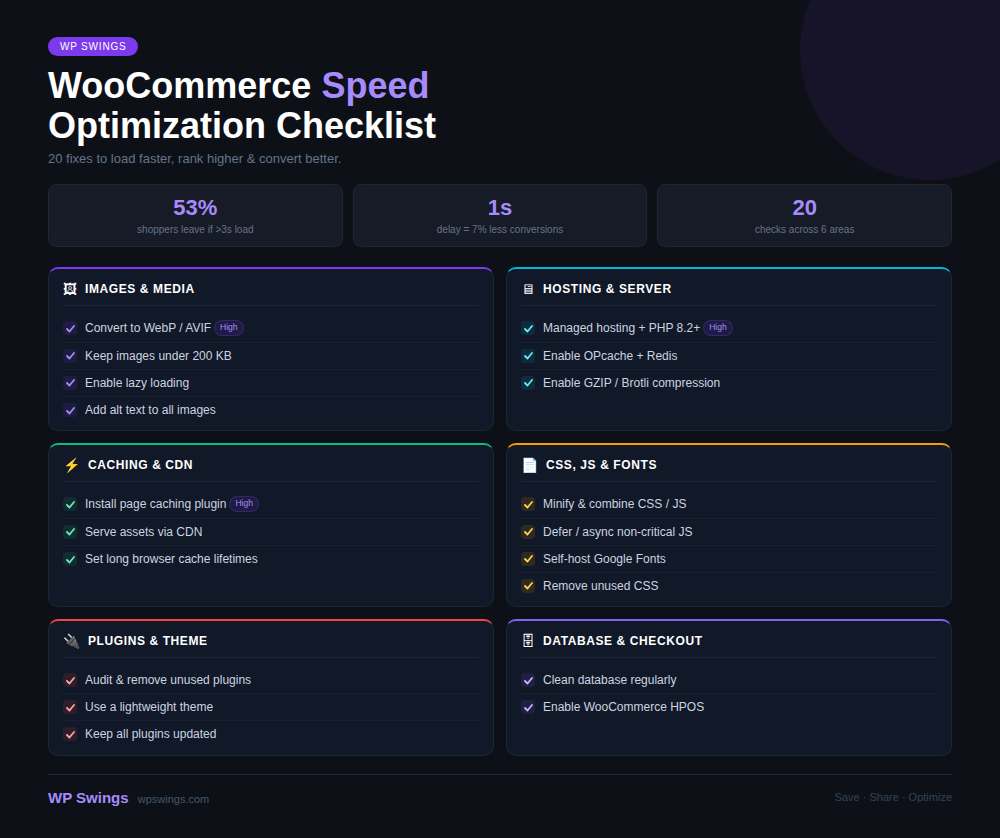
Checklist For WooCommerce Speed Optimization
We are almost at the end of this blog post, and by now we have established that speed is an important factor in running a website. It is a key that helps you to rank higher on search engines. Even a second is very important when it comes to loading your site. The faster your website loads, the more audience you will get.
Another big advantage of decreasing the loading speed is that it will tremendously help in improving user experience, no matter what device your visitors are using, i.e., mobile phones, tablets, or PCs.
So, if you want your WooCommerce store to reach the level of performance perfection, just follow these steps.
Frequently Asked Questions
1. Why is my WooCommerce store running slowly?
A slow WooCommerce website doesn’t happen by mistake. As your store grows, many factors can quietly impact the performance, leading to longer load times and loss of conversions & sales. Your WooCommerce store can be running slowly because of these causes –
- Installing Too Many Plugins
- Huge Media Files
- Excessive External Requests:
- Database Bloat
2. How can I improve the speed of my WooCommerce store?
WooCommerce store owners can improve the speed of their WooCommerce stores by implementing these tips –
- Choosing a Hosting Provider Optimised for a WooCommerce Store
- Optimize All Product Images & Store Visuals
- Delete Unused Themes & Plugins
- Use Lazy Loading If Required
- Use a CDN Network
3. What is the ideal page load time for a WooCommerce website?
The ideal page load time for a WooCommerce website is under 2 seconds. When it comes to a WooCommerce store, even a tiny 100-millisecond delay can negatively impact user conversion rates by 7%.
4. Does website speed affect WooCommerce conversions and sales?
Yes, around 53% of mobile users abandon a WooCommerce site if it takes longer than 3 seconds to load. For a WooCommerce store making ₹1,00,000 per day, a 1-second delay can cost up to ₹25,00,000 in lost sales every year.
5. How does image optimization improve WooCommerce speed?
Image optimization can significantly improve WooCommerce speed. Visuals such as product images, videos, and infographics are usually one of the main culprits behind slow site loading. So, your priority should be to optimize them without compromising on the overall quality. Doing so will dramatically boost the overall speed, thereby helping with WooCommerce Speed Optimization.
About the Author: Muskaan Sabarwal