Imagine you are booking tickets for a Coldplay concert. The countdown begins, the tickets you live. Within seconds, millions of fans are selecting seats as per different tiers (Gold, Silver & Platinum), choosing the seats, and making payments – all from one single platform, almost seamlessly. Ever wondered what supports such a high-demand event booking experience? This is exactly where a WordPress Ticketing System walks in.
Behind the scenes, it’s just not about selling tickets online. It is also about managing volume and delivering a smooth & unique user experience under pressure. From handling time slots and catering to tiered pricing to automating ticket confirmations & eliminating overbookings, the WordPress ticketing system brings structure to any event you are hosting, which would be chaos otherwise.
In A Hurry? Here’s A Brief Summary…
- No-show rates have surged from 15-20% to 60%–70% in some cases, with one in three attendees failing to attend at least one event in the past year.
- Total Ticketing Transaction value was $1.47 trillion in 2025, and is projected to be $3.37 trillion by 2030 – this is 128.6% market growth from 2025 to 2030.
- The event management software market was valued at $11.52 billion in 2025 and is expected to surpass $36.42 billion by 2035, expanding at a 12.2% CAGR.
- 89% of users save 200 hours a year, and 92% say it drives better results and engagement with the WordPress ticketing system.
- P66% of attendees and 66% of organizers ranked a fast, frictionless booking process as the most important feature of a WordPress ticketing system.
- 38% of all online ticketing volume comes from music concerts.
When it comes to selling tickets while utilizing the WordPress Ticketing system, things can get complex in no time. There is a wide variety of WordPress reservation system plugins on the market. And even after choosing the correct plugin, which functionalities will be suitable for your business (Whether you need a WordPress ticketing system for concerts, a gym, or restaurants) is another question.
This blog post will explain what a WordPress Ticketing System is, real use cases of WordPress Ticketing Systems, and much more.
In This Blog, We Will Talk About…
(Jump to the section that interests you the most!)
What Is The WordPress Ticketing System?
A WordPress ticketing system is an extension specifically designed to handle ticketing and event management within the WooCommerce framework.
These WordPress ticket systems are responsible for creating and selling event tickets for events, such as concerts, gyms, workshops, restaurants, or any other gatherings, easily and seamlessly for the organizers. These are directly sold through their WordPress/WooCommerce-powered online stores.
The key features that an event plugin must include are –
- The ability to create and manage events
- Support different kinds of tickets: early bird, VIP, general admission
- Barcode or QR code for tickets
- Dynamic settings to create WooCommerce event tickets for different events
- Automated email and SMS notifications for ticket confirmations and reminders for upcoming events.
- Tools for tracking ticket sales, revenue, and attendance statistics
How Does Event Tickets Manager For WooCommerce Help?

Events Tickets Manager for WooCommerce Pro streamlines the process for merchants to create and customize event tickets, offering layout options and supporting recurring events on Google Calendar. It supports seamless ticket delivery to customers via email, adds a new product category to the store, and makes it easy for merchants to add new events.
WooCommerce Events Calendar also ensures that timely notifications are sent to customers before scheduled events. Within the dashboard, merchants have access to a user-friendly interface to personalise ticket content and distribute it via email effortlessly.
Your All-in-One WordPress Ticketing System!
Real Use Cases Of WordPress Ticketing System
As promised, we have a dedicated section to showcase which functionalities of the WordPress ticketing system are useful for your website, whether you host concerts, own a gym that hosts workshops, or own a restaurant.
Let’s find out how wordpress ticketing system helps these websites –
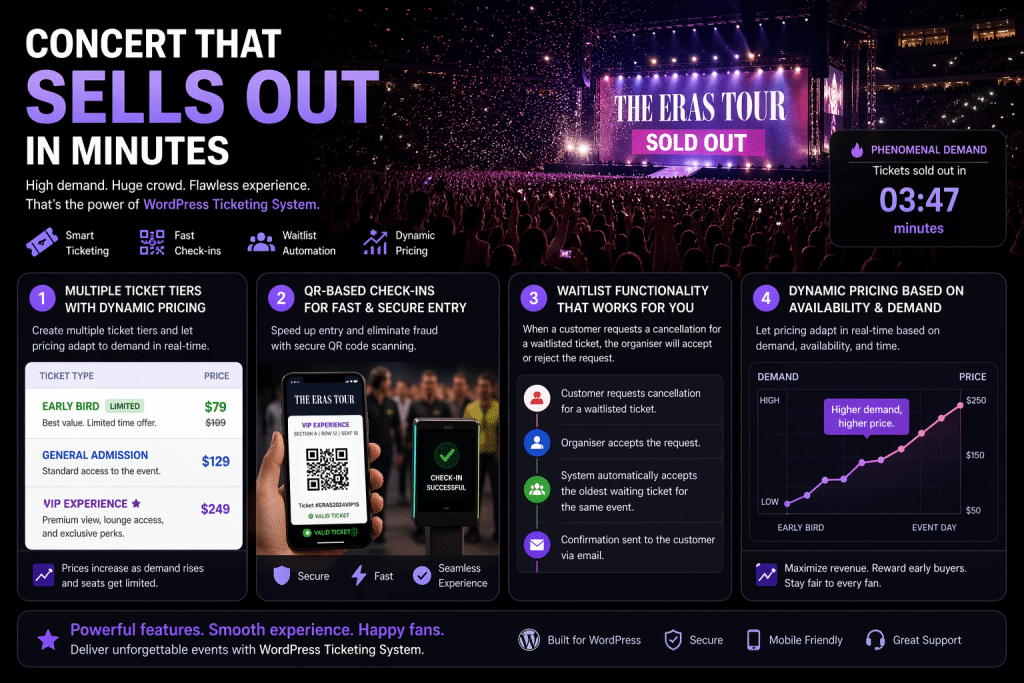
1. Concert That Sells Out In Minutes
Think of a high-demand concert like The Eras Tour, where thousands of individuals rushed to book at once. The challenge is to manage the demand, but the real challenge is to do that without breaking the experience.
With WordPress Ticketing System, organisers can –
- Create multiple ticket tiers with dynamic pricing (Early Bird, VIP, or General Admission)
- QR-Based check-ins for fast and secure entries
- Waitlist functionality: When a customer “requests cancellation” for a waitlisted ticket, the organiser will accept or reject. If he accepts it, the system automatically accepts the oldest waiting ticket for the same event, and confirms it, notifying the customer via email.
- Apply dynamic pricing based on the availability and demand.
Let us put all these functionalities in the real concert scenario –
2. Gyms Hosting Workshops
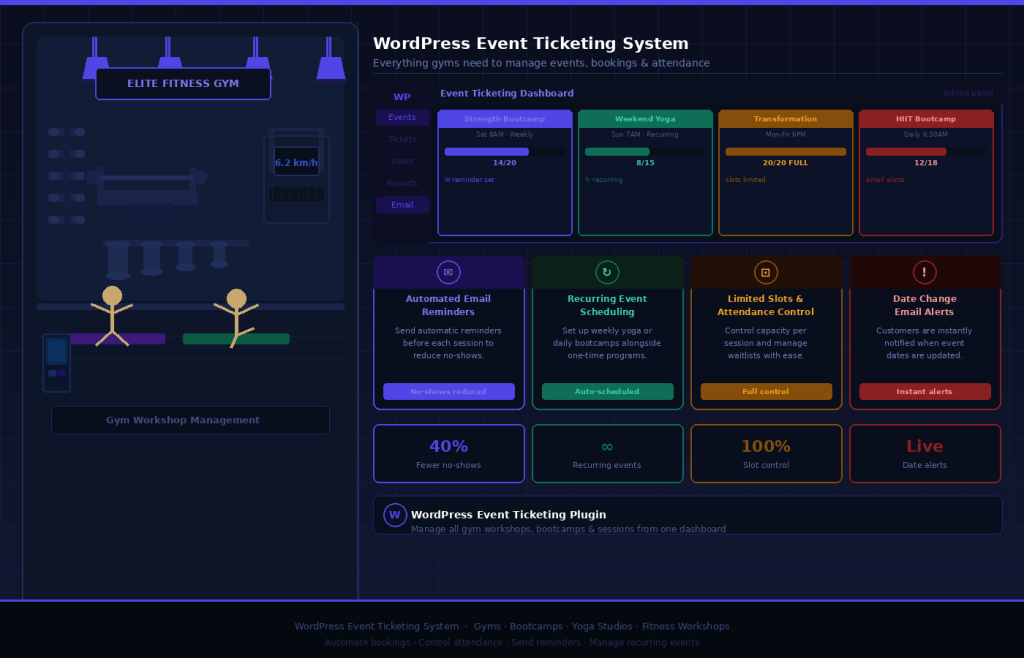
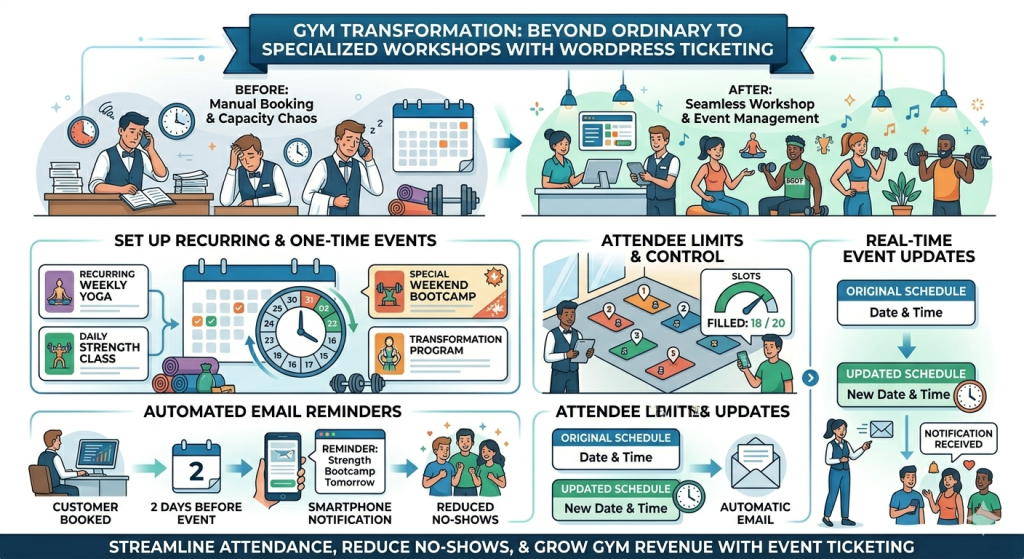
With growing competition, even ordinary gyms are seen branching out. They are also hosting specialised workshops such as strength bootcamps, weekend yoga sessions, or transformation programs that require a structured WordPress Ticket System.
With the WordPress event ticketing system, gyms can –
- Send automated email reminders to reduce no-shows
- Set up recurring events alongside one-time bootcamps
- Access full control over attendance with limited slots per session
- Keep customers informed about date changes for a specific event. They will receive email notifications.
Let us put all these functionalities in the real concert scenario –
3. Restaurants Launching Weekend Dining Experience
Restaurants are no longer taking basic reservations but crafting unique dining experiences, especially on weekends, to maximise demand &revenue.
With the WordPress Ticketing System, restaurants can –
- Allow customers to share the listed events on different social media platforms for promotions
- Display the total number of attendees who have checked in for each event, on the event listing page (frontend) and the backend dashboard (backend), using a filter.
- Prepaid reservations to reduce no-shows
- Easily manage multiple event-based dining, like chef’s specials or menu tasting nights
- Send customizable feedback emails to the customers attending different events listed on their platform
Let us put all these functionalities in the real concert scenario –
Events Tickets Manager for WooCommerce Pro is the first choice for event management professionals because it simplifies the process for organisers to customise and generate event tickets, offering a variety of layouts.
BONUS SECTION!!! – Features That Solve Problems for All Industries
Don’t see your industry or business type in the listicle mentioned above? Don’t worry, because this section is curated especially for you…
Sell and create WooCommerce event tickets seamlessly by using our plugin. But why our plugin? See for yourself…
- Event Date Offset: This functionality allows organizers to set a buffer period before and after the event begins. This is useful for accommodating setup or wrap-up time for admins, offering early access, or providing a grace period around the official event duration.
- External CSS Field: Organizers get access to a dedicated setting, where they can enter their own external CSS stylesheets. This allows store owners the ability to customize the appearance of event tickets, event pages, and templates without editing the plugin files or using inline styles. For example, here we have changed the button text color to blue.
- Increase Price By Days: Sell tickets based on the days of the event. This increases your income and notifies customers of the number of days left for an event.
- Display Multiple Locations: Organizers can display multiple locations for a single event. There is no limit on selecting the locations; you can list as many as you like.
- Recurring Events: Set Recurring Events on a Daily, Weekly, or Monthly Basis. Conveniently set the recurring date and time for any event. The event can recur daily, weekly, or monthly in the time slot selected by him.
- Utilize QR Codes for Easy Check-Ins: The WooCommerce events plugin allows customers an easy check-in process by using QR Codes.
- Stay Updated Via Event Alerts: Keep your customers updated. Customers can notify them about upcoming events using the “Subscribe” button.
The WooCommerce Event Tickets Plugin Is Your One-Stop Solution!
Frequently Asked Questions (FAQs)
1. What is a WordPress ticketing system?
A WordPress ticketing system is an extension specifically designed to handle ticketing and event management within the WooCommerce framework.
These WordPress ticket systems are responsible for creating and selling event tickets for events, such as concerts, gyms, workshops, restaurants, or any other gatherings, easily and seamlessly for the organizers.
2. Which is the best WordPress plugin to sell event tickets?
The best WordPress plugin to sell event tickets is Events Tickets Manager for WooCommerce Pro, which streamlines the process for merchants to create and customise event tickets, offers layout options, and supports recurring events on Google Calendar. It supports seamless ticket delivery to customers via email, adds a new product category to the store, and makes it easy for merchants to add new events.
3. Can I sell tickets for virtual events with a WordPress ticketing plugin?
Yes, you can sell tickets for virtual events with a WordPress ticketing plugin to streamline the processes of registration, ticketing, audience engagement, streaming, analytics, and more. Registration is often the most essential component of any online event. The Events Calendar has an add-on called Event Tickets. It enables registration creation and management, which is easy on WordPress.
About the Author: Muskaan Sabarwal