Education websites rely heavily on PDFs to share study materials, course brochures, research papers, and learning resources. While PDFs are useful, they often provide a basic reading experience that can feel dull and hard to navigate, especially for students accessing content online.
A WordPress Flipbook PDF offers a better way to present educational content. Instead of scrolling through static documents or downloading files, users can read PDFs in an interactive, book-like format with smooth page flips, zoom options, and easy navigation.
Key Takeaways:
- Static PDFs often reduce engagement and make learning materials harder to consume on education websites.
- WordPress Flipbook PDFs transform PDFs into interactive, book-like formats that are easier to read and access.
- Better user experience leads to higher student engagement and improved learning outcomes.
- Flipbook PDFs are ideal for textbooks, study notes, brochures, research papers, and academic resources.
- User experience is essential for education platforms, directly impacting trust and repeat visits.
- A dedicated WordPress PDF Flipbook plugin makes creating and embedding flipbooks simple and code-free.
- PDF Generator for WP Pro by WP Swings helps education websites present documents in a modern, mobile-friendly, and professional way.
- Small changes in content presentation can create a big improvement in accessibility and engagement.
Using WordPress Flipbook PDFs, education websites can improve readability, and deliver learning materials in a more modern and user-friendly way. This small change in content presentation can make a big difference in how students and educators interact with digital resource.
But before, let’s clarify what we mean by WordPress Flipbook PDF
Table Of Contents
What is a WordPress Flipbook PDF?
A WordPress Flipbook PDF is an interactive way to display PDF files on a WordPress website in a book-like format. Instead of scrolling through a static document or downloading a file, users can flip pages digitally, just like reading a real book online.
It uses a 3d flipbook WordPress plugin to convert regular PDFs into flipbooks with page-turning animations, zoom controls, search functionality, and fullscreen viewing.
This makes long documents easier to read, more engaging, and accessible across devices.
How Does a WordPress Flipbook PDF Work?
A WordPress Flipbook PDF works by uploading a PDF file into a flipbook or a PDF plugin. The plugin then renders the PDF into an interactive viewer that can be embedded directly on any WordPress page or post.
Once added, users can:
- Flip pages smoothly
- Zoom in for better readability
- Search text within the PDF
- View the document in fullscreen
- Access content without downloading files
All of this happens inside the browser, creating a smooth reading experience.
Ok, now you know what is WordPress flipbook PDF and how it works but
Why Should You Use a WordPress Flipbook PDF Instead of a Normal PDF?
Well, let me answer that
Traditional PDFs are functional but limited. A WordPress Flipbook PDF improves content presentation and user engagement.
Other key advantages include better readability for long documents, an interactive page-flipping experience, mobile-friendly and responsive design, and reduced bounce rates.
Now you might be thinking does user experience really matter for education websites?? Let me clear that doubt as well..
Why User Experience Matters for Education Websites?
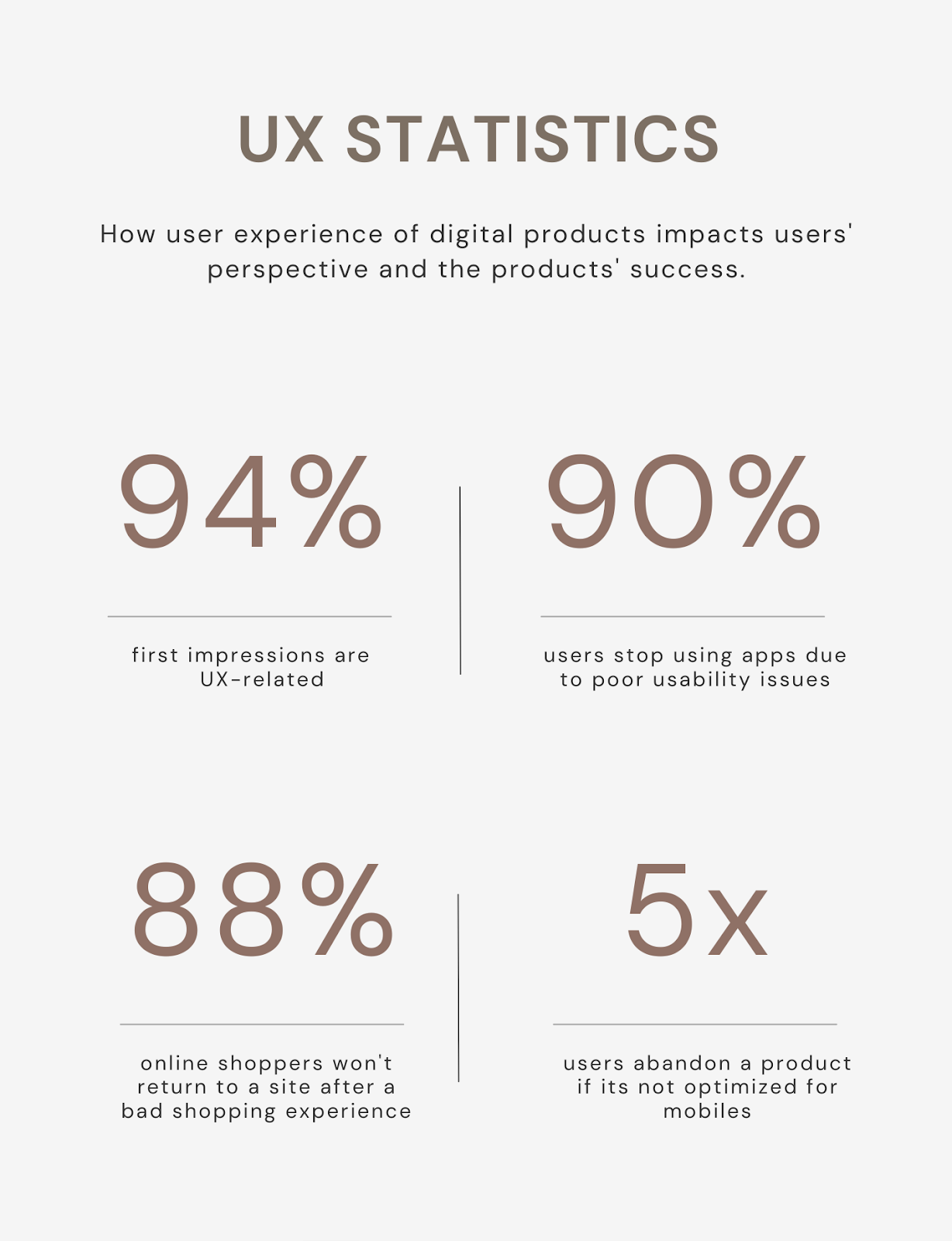
User experience (UX) plays a critical role in how students, teachers, and parents interact with education websites. These platforms are often used to access study materials, course information, academic resources, and important documents.
If the website is difficult to navigate or content is hard to read, users are more likely to leave.
[Image Source: aufaitux.com]
How Poor User Experience Affects Education Websites
When user experience is ignored, education websites can face:
- High bounce rates from frustrated users
- Low engagement with learning materials
- Difficulty accessing PDFs and documents
- Reduced trust in the institution or platform
Students expect smooth, distraction-free access to learning resources. Even small usability issues can interrupt the learning process.
Key Use Cases of WordPress Flipbook PDFs in Education
Flipbook PDFs are widely used in the education sector to present learning materials in a more engaging and user-friendly way.
- One of the most common use cases is digital textbooks and study materials. Schools, colleges, and coaching institutes can share textbooks, notes, and guides as flipbooks, with options to flip pages, zoom in on content, and read comfortably on any device.
- Flipbook PDFs are also effective for course brochures and prospectuses. Universities and training institutes can showcase course details, fee structures, campus information, and other important info in an interactive format that feels more professional and engaging than a standard PDF download.
- Another important use case is research papers and academic journals. Long academic documents can be difficult to navigate in traditional PDFs, but flipbooks make browsing and reading smoother, especially for students and researchers reviewing multiple sections.
In all these cases, flipbook PDFs help education websites deliver content in a clear, interactive, and accessible way that supports better engagement and learning.
Now you know the use cases and ways you can use to add flipbooks in your educational websites, and you also know how PDF flipbooks work and why its important.
All you need now is a good plugin, that can help you integrate this functionality easily.
Don’t worry, I’ve got you!
How Our WordPress PDF Flipbook Plugin Helps Education Websites
Education institutions manage a wide range of documents. Our WordPress PDF Flipbook plugin, available as part of PDF Generator for WP Pro by WP Swings, helps schools, colleges, and eLearning platforms present these documents in a more interactive and user-friendly format.
Instead of asking users to download PDFs, pdf plugin allows institutions to convert PDFs or images into flipbooks that can be viewed directly on the website.
Here is how our WordPress PDF Flipbook Plugin can help you
1. Easy Flipbook Creation for Educational Content
Creating a flipbook is simple and does not require technical skills. After enabling the Flipbook option from the plugin’s general settings, a dedicated Flipbook section becomes available in the WordPress dashboard.
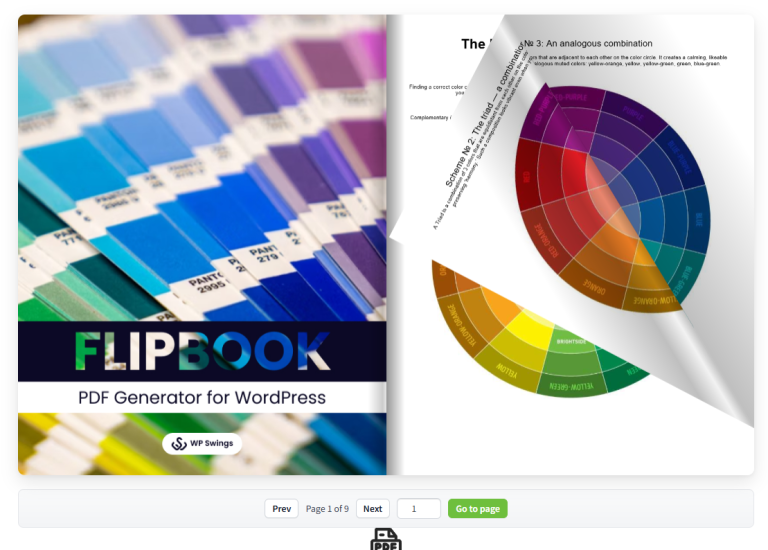
Education teams can:
- Create flipbooks using PDF files or multiple images
- Assign a clear title for each flipbook (for example, course notes or subject guides)
- Publish flipbooks and embed them anywhere using a shortcode
2. Custom Layout and Display Options
PDF plugin offers flexible layout controls, allowing institutions to match flipbooks with their website design.
You can:
- Set custom width and height for flipbooks
- Enable flipbook tools for better navigation
- Add front and back cover pages for textbooks, brochures, or manuals
3. Better Reading Experience for Students
The flipbook configuration settings are designed to improve readability and usability, especially for students accessing content online.

Key features include:
- Popup modal view for distraction-free reading
- Mobile scroll support for smartphones and tablets
- Adjustable page flip speed and swipe distance
- Mouse and touch-based page flipping
- Optional page flip sound with volume control
4. Simple Embedding Across Education Websites
Once a flipbook is published, the plugin generates a shortcode that can be added to:
- Course pages
- Student dashboards
- Resource libraries
- Blog posts or announcements
Why This Plugin Works Well for Education Institutions
WordPress PDF Generator Plugin by WP Swings is built to support growing and content-heavy websites. Along with flipbook creation, it offers:
- Compatibility with popular page builders like Elementor and Divi
- Multilingual and RTL support using WPML
- Support for modern WordPress and WooCommerce setups
- Reliable performance for single-site and multisite education platforms
Turn Static PDFs Into Interactive Learning Experiences
Over to You!!
Education websites should support learning, not slow it down. Static PDFs often break the learning flow, while a WordPress Flipbook PDF turns educational content into an interactive, easy-to-read experience that keeps students engaged.
Presenting textbooks, notes, and academic resources as flipbooks, institutions can improve accessibility, and deliver learning materials in a format today’s learners expect.
A better reading experience leads to better learning, and flipbook PDFs make that possible.
Let’s now see some of the most frequently asked questions to clear any further doubts you have
Frequently Asked Questions
How to make a flipbook on WordPress?
To make a flipbook on WordPress, install WordPress PDF Plugin by WP Swings which fully supports flipbook creation. Upload your PDF or images, configure the flipbook layout and settings, publish it, and embed it on any page or post using a shortcode or block.
How do Flipbook PDFs enhance the presentation of study materials?
Flipbook PDFs enhance study materials by turning static documents into interactive, book-like experiences. Features like page flipping, zoom, and fullscreen viewing improve readability, keep students engaged, and make long educational documents easier to navigate.
Can Flipbook PDFs be embedded directly into WordPress education websites?
Yes, Flipbook PDFs can be embedded directly into WordPress education websites. Most flipbook plugins generate a shortcode or block that allows institutions to display flipbooks on course pages, resource sections, or student dashboards without requiring downloads.
Are WordPress Flipbook PDFs mobile-friendly?
Yes, WordPress Flipbook PDFs are mobile-friendly when created using a WP Swings PDF plugin. They support touch gestures, smooth scrolling, and adaptive layouts, allowing students to read learning materials easily on smartphones and tablets.
How to turn a PDF into an interactive PDF?
To turn a PDF into an interactive PDF, use WordPress PDF Generator Plugin by WP Swings which converts PDFs into flipbooks. Upload the PDF, enable interactive features like page flipping and zoom, and publish it as an embedded viewer on your website instead of offering it as a static download.
About the Author: Mohd Talib