
Healthcare providers and clinics continue to face growing pressure to deliver on time and provide seamless care while managing increasing patient volumes. Traditional appointment booking systems, such as calls and manual registrations, often lead to long wait times, missed doctor appointments, double bookings, and frustrated patients. Administrative staff are overburdened with work, wasting valuable hours coordinating schedules, confirming visits, sending reminders, and handling rescheduling requests. This leaves less time for patient-facing tasks.
Furthermore, for patients, limited booking hours, unclear availability, and delayed confirmations create unnecessary stress before care even begins. These errors not only affect operational workflows but also directly impact patient trust, satisfaction, and retention. This is why having a centralised modern appointment booking system becomes the need of the hour.
Key Takeaways:
- 92% individuals reported that good patient care is “extremely” important for their well-being & health.
- 43% patients find “waiting” to be the most frustrating part of a doctor’s visit.
- 71% of patients reported that good patient care is significant because their health and well-being are at stake.
- More than 3 out of 5 patients reported using a medical portal.
- 59% of millennials said they are willing to switch doctors if it means better online access.
- 68% of patients preferred the ability to book, change, or cancel appointments when choosing a health care provider.
- 38.1% of patients stated that an SMS could have helped prevent them from missing an appointment.
- 19% preferred an email reminder instead.
- 20% of patients said they were switching doctors for the sole reason of shorter wait times.
In this blog, we will explore how clinics and healthcare providers can overcome various scheduling challenges by implementing an appointment booking system and how this simple change can significantly improve overall patient care and experience while streamlining daily operations, eliminating manual work.
In This Blog, We Will Talk About…
(Jump to the section that interests you the most!)
How Does a Traditional Appointment Booking System Affect Patient Care?
The Traditional appointment booking system relies heavily on phone calls, fixed working hours, and manual coordination of daily operations, creating multiple hurdles for both patients and healthcare staff.
Patients in such cases are often forced to wait on hold for a longer period, call during limited office hours, or make multiple attempts just to secure an appointment. This delay in accessing healthcare facilities discourages timely care for non-urgent consultations or follow-ups that still require attention.
These are some of the many challenges faced by healthcare professionals while using traditional appointment booking systems –
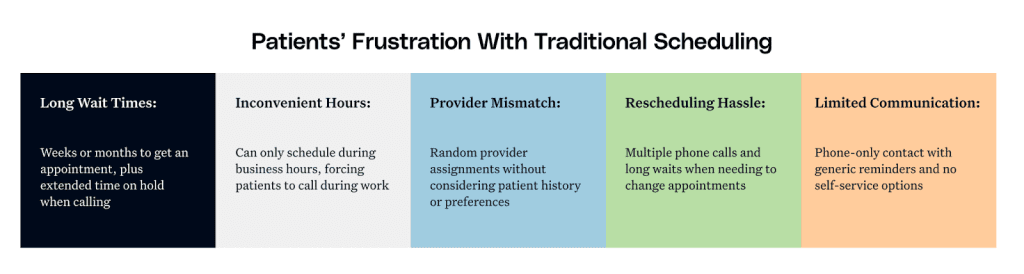
- Limited booking hours force patients to schedule appointments only during the clinic’s working hours.
- Long wait times on support calls lead to patient frustration and delayed access to health care facilities.
- Manual appointment scheduling increases the risk of double bookings for a single slot.
- The Traditional appointment booking systems’ lack of real-time availability further creates confusion and repeated follow-ups.
- The no-show rates increase due to the absence of automated reminders and confirmations.
- The inefficiency of rescheduling processes disrupts healthcare workflows while hampering staff productivity.
- Poor time-slot management often causes overcrowded waiting rooms.
- Manual management of administrative tasks overburdens the clinic staff, which reduces focus on patient care.
- Errors in manual appointment scheduling results? Inconsistent patient experience, which impacts trust, satisfaction, and retention.
To solve these challenges and eliminate the risks of delayed healthcare for patients, healthcare providers are increasingly turning to digital appointment booking systems built on WordPress/WooCommerce. For growth-focused providers, pairing these systems with strategic healthcare app development ensures consistent, connected patient journeys across website, patient portal, and mobile app touchpoints.
Let’s explore how WordPress appointment booking systems transform healthcare practices by streamlining scheduling workflows, improving patient accessibility, eliminating operational strain on medical staff, and reducing no-shows.
How WordPress Appointment Booking Systems Transform Healthcare Practices?
As a healthcare provider, dealing with patients daily is a hassle enough; you should not have to worry about manual patient appointment handling, no-shows causing revenue loss, errors in appointment scheduling, long waiting lines, staff inefficiency, and the need for online appointment payments.
As discussed earlier, a traditional appointment booking system creates more errors when it should be solving the problem. What should you do in such a case? Well, the answer is simple: implement Bookings for WooCommerce Pro.
How does this appointment booking system help? See it for yourself!
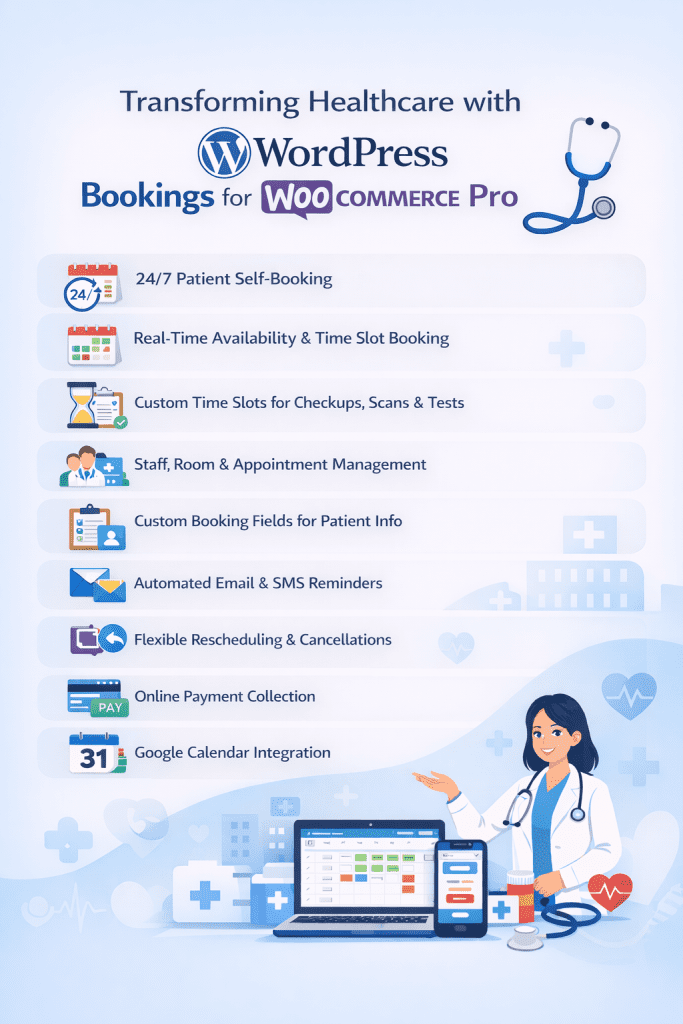
1. Real-Time Availability and Time-Slot Booking
By utilizing the appointment booking system, patients can view and select available appointment slots in real time. This eliminates the frustration of calling during office hours, waiting on calls for longer periods, or delayed staff confirmation. This transparency between healthcare providers and patients reduces scheduling conflicts and enhances patient convenience.
2. Custom Booking Fields for Patient Information
Healthcare providers often need critical details at the time of booking appointments, such as the reason for the visit, symptoms, patient name, age, gender, or insurance data, including information related to major medical insurance
The appointment booking system allows clinics to add as many custom fields to the booking form as required. This ensures that relevant patient information is collected upfront, which eliminates the need for any further administrative follow-ups.
3. Automated SMS and Email Reminders
There is nothing that disrupts clinic workflows more than missed appointments, and reduces healthcare capacity. The appointment booking system allows you to send reminder emails/SMS with ease by utilising the unique template and the shortcodes available on the backend.
Combined with archiving solutions that securely store patient communication and keep records organised, reminder emails and SMS give you the extra edge needed to stay ahead of the competition.
4. Flexible Rescheduling and Cancellation Options
Life can get uncertain, and patients often need flexibility to reschedule appointments. The appointment booking system enables patients to reschedule or cancel appointments online without any staff intervention. This reduces phone traffic and improves patient experience, all while keeping schedules up and running.
5. Google Calendar Sync and Staff Availability Management
The Appointment booking system can integrate clinic calendars with external calendars (such as Google Calendar or Outlook). This ensures that doctors’ and staff schedules remain in complete sync. This further avoids the errors of double bookings, provides staff with a centralised view of their commitments, and improves resource planning.
6. Service-Specific Booking and Time Blocks
Clinics often manage different types of appointments (consultations, follow-ups, diagnostics). The appointment booking system supports multiple services (i.e., the doctors can create multiple bookable products) with dedicated time durations, allowing practices to allocate appropriate time blocks by utilising both single & dual calendars and optimise utilisation of clinical resources.
7. 24/7 Patient Self-Booking
Patients can book appointments at any time without relying on the clinic’s working hours. Choosing the right online medical appointment booking system ensures this process is GDPR-compliant and integrated with clinical workflows. This ensures faster access to care, improves patient convenience, and reduces inbound scheduling calls for administrative staff. For providers managing chronic or post-discharge patients, pairing a 24/7 booking system with a remote healthcare monitoring platform like CCN Health further extends care continuity, allowing clinicians to track patient vitals between appointments and intervene before an in-clinic visit becomes urgent.
8. Staff, Room, and Appointment Slot Management
Healthcare facilities often manage multiple doctors, rooms, and equipment. Some doctors might see patients daily, others might see on particular days. The appointment booking system enables clinics to define availability based on staff schedules, room capacity, and appointment slots, preventing overbooking and improving operational coordination. It also supports better patient care by integrating services like remote patient monitoring for more efficient healthcare management
9. Custom Time Slots for Healthcare Services
Different medical facilities often require different time allocations. Healthcare providers can create custom time slots for services such as routine checkups, scans, lab tests, or specialist consultations. This ensures accurate scheduling and optimal resource utilisation.
10. Online Payment Collection
The appointment booking system helps healthcare providers to provide secure online payment options. Further clinics can collect fees for online consultation or advance payments during booking.
This reduces payment delays, minimises cancellations, and simplifies billing workflows. Many healthcare providers also leverage medical billing outsourcing to streamline claims processing, reduce administrative burden, and improve revenue cycle efficiency
WordPress Bookings Plugin is easy to INSTALL!!!
Real-World Use Cases Of Booking For WooCommerce In Healthcare
We have already established that having an efficient WordPress booking system in place does wonders for both healthcare providers and patients. It directly impacts your patient care.
Let us see, how different healthcare providers can use a hospital management system in their daily operations.
1. Dentist Clinic Appointment
Dentist clinics often face the problem of double slot bookings, not being able to collect accurate patient details, and the unavailability of doctors on certain days also confuses the customers (this further engages the staff to answer customers’ questions regarding doctors’ availability)
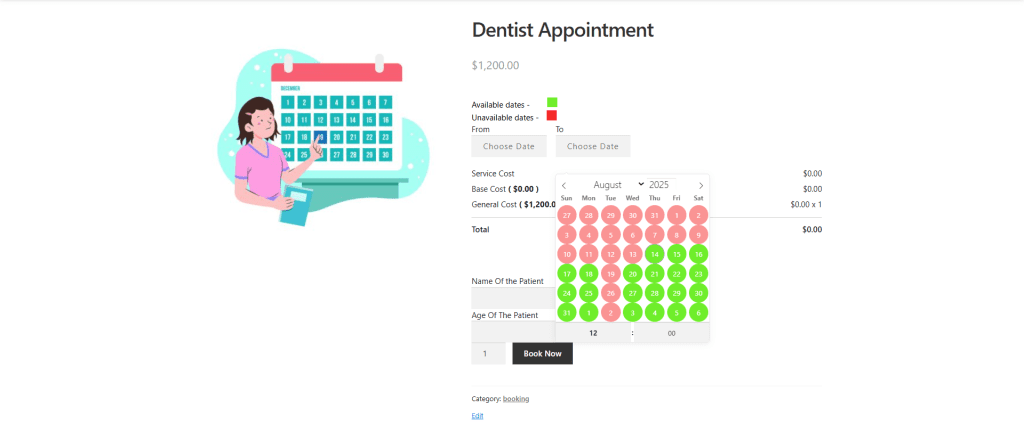
The appointment booking system’s booking unavailability feature enables healthcare providers to block off days when practitioners are unavailable, which eliminates accidental bookings. his not only reduces scheduling conflicts but also allows patients to plan ahead with greater confidence, including for regular dental check-ups. The Custom Booking Fields help capture important patient details such as name or age, and also syncs with Google Calendar, keeping both staff and patients updated in real-time – an approach commonly used in modern healthcare management systems to reduce administrative friction and improve care coordination.
2. Eye Check-Up Scheduling
Eye clinics and optometrists often use custom time slots to manage routine eye check-ups, vision screenings, and follow-up visits. Real-time availability enables patients to choose convenient appointment times.
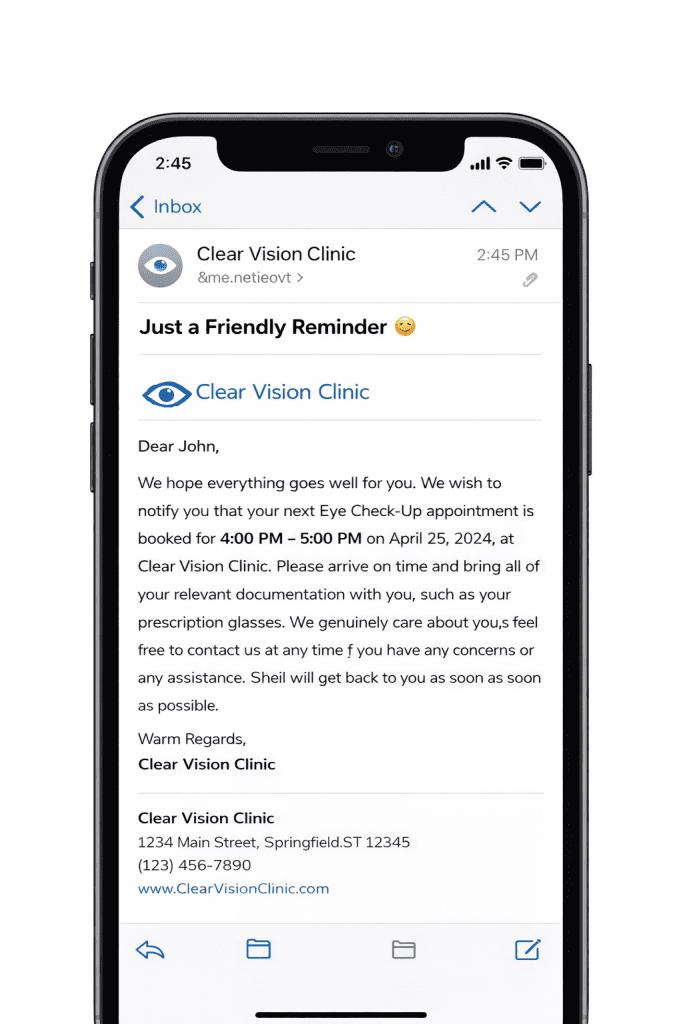
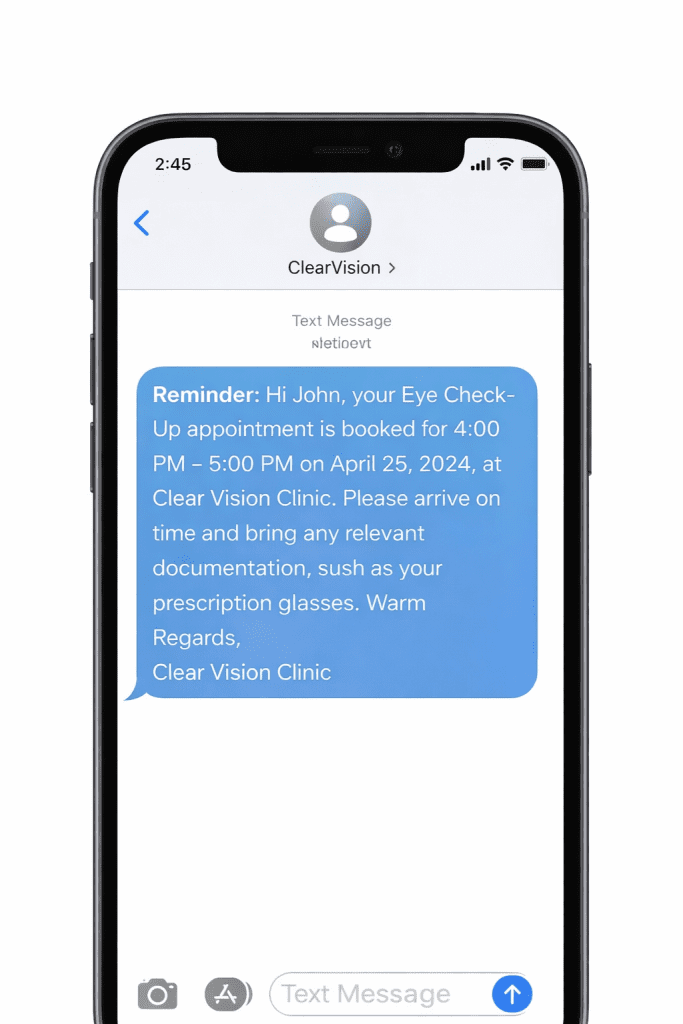
Automated email and SMS reminders help reduce the number of missed appointments. While collecting payments Online helps secure bookings for paid eye tests or screenings.
3. Physiotherapy Sessions
Physiotherapy clinics rely heavily on custom service-based time slots to schedule multiple-session therapy appointments. Staff availability management ensures sessions are accurately assigned to the correct therapist, while flexible rescheduling options accommodate patient recovery timelines. Google Calendar integration keeps therapists’ schedules synchronised across devices.
4. Diagnostic Lab Test Bookings
Diagnostic labs utilise custom booking fields to collect patient information, such as test type, fasting requirements, or report preferences, at the time of booking. They can also integrate with external logistics such as medical courier services for timely lab and sample transport.
5. Gynaecologist/Dermatologist Consultation Booking
Clinics that specialise in providing a specific healthcare facility use dedicated appointment slots for different types of consultations. 24/7 patient self-booking increases accessibility, while secure, private, structured booking forms collect relevant details. Automated reminders help maintain consistent patient flow without manual follow-ups.
6. Hospital Specialist Scheduling
Hospitals that manage multiple departments utilise staff, rooms for different procedures, and appointment slot management to coordinate specialist availability. The integration with Google Calendar ensures real-time visibility for doctors’ schedules, while setting maximum booking limits prevents overbooking.
Over To You!!!
With the Bookings for WooCommerce plugin, you can streamline all your clinic appointments with complete ease.
Delivering seamless patient care is not optional, but it is a critical part of patient care. A traditional appointment booking system creates friction and confusion, leading to the burden of manual patient appointment handling, no-shows causing revenue loss, long waiting lines, staff inefficiency, and the need for online appointment payments.
Adopting a modern appointment booking system gives you access to benefits such as 24/7 patient self-booking, automated reminders, staff, room, and appointment slot management, online payment collection, custom time slots for services like checkups, scans, tests, and seamless calendar syncing through epic integration with Google Calendar. With Booking for WooCommerce Pro, you streamline daily operations while improving patient experience. Clinics can focus less on scheduling and more on providing timely healthcare services.
If you are still confused about the functionalities of the WordPress Booking plugin, you can check out this video –
Frequently Asked Questions
1. How Can I Create A Online Booking System For Free?
Yes, you can easily create a online booking system for free just by installing Bookings for WooCommerce.
Automatic Installation
When it comes to automatic installation, WordPress is the most user-friendly.
To do so, all you have to do is – utilize your username and password and log in to your WordPress admin area. Then navigate to Plugins > Add New inside the leftmost column of your dashboard. At the top of the front page, click the Upload Plugin option.
Choose the Bookings for WooCommerce-based .zip file from the Add New Plugin option, then push Install Now. Activate the WooCommerce booking plugin once it has been properly configured, to make the plugin features in action.
Manual Installation
Another way to install the WooCommerce appointments plugin in your WordPress environment is to use the manual installation option. Manual installation involves downloading and uploading the Bookings for WooCommerce plugin to the web server using their preferred FTP client.
- Upload the Bookings for WooCommerce folder to the /WP-content/plugins/directory.
- Navigate to the Plugins menu in WordPress to activate the plugin.
- That is all there is to it.
2. Can I use Outlook As A Booking System?
Yes, you can use Outlook as a Booking System. We have introduced the concept of our “Global Calendars” being synced with Outlook. Sync the global booking calendar with Outlook’s calendar. Suppose specific dates are set as unavailable on Outlook’s calendar. In that case, an automated cron job that runs every 5 minutes will update the global bookings calendar (in your WooCommerce store) to block those same dates, and vice versa. Similarly, any changes made to the store’s global calendar will also be reflected in Outlook’s calendar, ensuring both stay perfectly in sync.
3. What Is The Best Booking System For a Small Business?
The best booking system for a Small Business is hands down Booking for WooCommerce Pro. Why? Because it is easy to set up, and –
- A separate booking list is offered on the WC order listing panel with a specialised WooCommerce Bookings tag for easy sorting.
- A precise number of booking cancellation and processing days can easily be defined.
- Effortlessly show/hide the additional booking form details using render settings.
- Provide booking service location navigation through the booking location feature.
- Early Bird Discount coupons can easily be offered.
- Before the service is available, you will receive email and SMS reminders.
- Fully customised email/SMS templates for different business types.
4. What Is The Cheapest Booking System?
The pricing model for Booking for WooCommerce has a lot of varieties to offer:
Let’s elaborate on the pricing –
- Free on WordPress ORG: WooCommerce Booking Plugin
- 1 Site Plan: $69/ Year
- 5 Site Plan: $169 / Year
- 10 Site Plan: $349/ Year
About the Author: Muskaan Sabarwal