
Managing large amounts of store data is a normal part of running a WooCommerce store. Whether it’s products, orders, customers, or coupons, store owners often need an easy way to move data in and out of their site. That’s exactly what the Import Export Suite for WooCommerce is built for. It’s an all-in-one plugin that helps you import, export, and update WooCommerce data quickly and efficiently.
As a store grows, handling data manually becomes time-consuming and risky. You should bulk update product prices, migrate data to a new site, share order details with third-party tools, or regularly back up store data. A powerful import/export tool makes these tasks faster, more accurate, and far less stressful. Instead of editing hundreds of entries one by one, you can manage everything through structured files like CSV or XML.
This review is for WooCommerce store owners who want better control over their store data. If you’re looking for a reliable way to manage WooCommerce data at scale, this plugin is worth a closer look.
In This Blog, We Will Talk About…
- What Is The Import Export Suite For WooCommerce?
- How Does It Compare To Woocommerce Default Import/Export Options?
- Pros & Cons of Import Export Suite for WooCommerce
- Real-World Use Cases
- Final Verdict
(Jump to the section that interests you the most!)
What Is The Import Export Suite For WooCommerce?
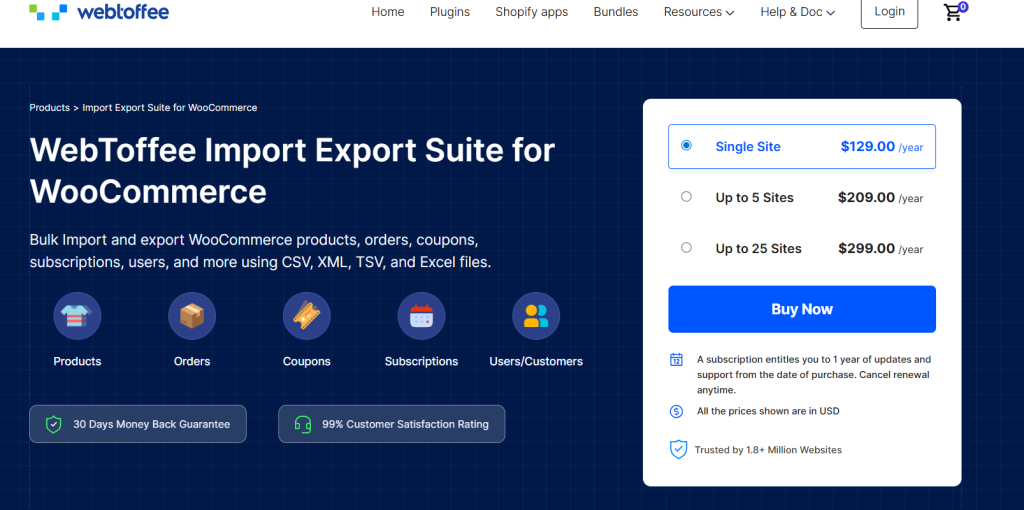
The Import Export Suite for WooCommerce is a powerful WordPress plugin developed by WebToffee to make moving data in and out of your WooCommerce store easy and reliable. It acts as a bridge between your store and data files, so you can import, export, update, and migrate store information like products, orders, customers, coupons, and more without headaches or technical hurdles.
In the WooCommerce ecosystem, this plugin fills an important gap. While WooCommerce has some built-in tools for basic product import and export, they are limited in terms of versatility and depth. For store owners who deal with complex catalogs, large volumes of orders, or frequent data updates, those basic tools just don’t cut it. That’s where the Import Export Suite steps in.
At its core, this plugin promises hassle-free data management:
- Smooth Data Migration: Move your store’s data from one site to another without losing details or spending hours manually copying records.
- Bulk Updates: Make mass changes at once, like updating prices, inventory, categories, or custom fields, without editing each item one by one.
- Customizable Imports and Exports: Choose exactly what you want to include or exclude, map fields to match your file formats, and tailor the process to your workflow.
How Does It Compare To WooCommerce Default Import/Export Options?
WooCommerce’s native import/export features are useful for simple tasks, like adding a few products or pulling a list of orders. But they fall short in several ways:
- Limited Data Types: The basic tool usually focuses on core products and customers, but doesn’t always handle advanced fields, order data, or custom metadata well.
- Minimal Filtering or Automation: There’s no way to schedule exports, apply complex filters, or reuse templates in the built-in tools.
- No Bulk Update Rules: Updating large volumes of data often requires repetitive manual steps or manual edits to external spreadsheets.
The Import Export Suite expands on these limitations by offering deeper control, smarter automation, and more flexibility, making it a go-to solution for anyone needing serious data handling in WooCommerce.
Core Features
The Import Export Suite for WooCommerce stands out because it goes beyond basic data transfers and gives you full control over how your store data is handled. Below is a closer look at its key features.
1. Supported Data Types
One of the biggest strengths of this plugin is its support for a wide range of WooCommerce data. You can import and export almost every important data type from your store, including:
- Products – simple, variable, grouped, affiliate, custom, and subscription products
- Orders – along with order statuses, line items, taxes, shipping details, and metadata
- Users/Customers – including customer profiles and related information
- Coupons – discount rules, usage limits, and expiry details
- Reviews and Subscriptions – useful for store migrations and backups
This makes the plugin suitable not just for product management, but also for full-store migrations and data backups.
2. Multiple Import/Export Methods
Import export suite offers different ways to import or export data, depending on how much control you need:
- Quick Import/Export – Ideal for simple tasks where you want to move all data at once with minimal setup.
- Advanced Options and Filters – Fine-tune what data gets imported or exported by applying conditions, skipping fields, or modifying values during the process.
- Pre-saved Templates – Save your field mappings and settings so you can repeat the same import or export process with a single click. This is especially useful for recurring tasks.
These options make the plugin flexible enough for both beginners and advanced users.
3. File Format Support
The Import Export Suite supports multiple file formats, making it easy to work with different systems and tools. Supported formats include:
- CSV
- XML
- TSV
- Excel (XLS/XLSX)
This flexibility is helpful when sharing data with third-party platforms, accounting tools, or fulfillment services.
4. Bulk Edit & Update
Instead of editing products or orders one by one, the plugin allows you to update data in bulk during import. You can apply rules or formulas to:
- Increase or decrease prices
- Update stock levels
- Modify categories, tags, or custom fields
- Change order or customer details
This feature saves a huge amount of time, especially when running sales, updating inventories, or making site-wide changes.
5. Scheduling (Automation)
For stores that require regular data transfers, the plugin includes automation features:
- Schedule imports and exports at specific intervals
- Connect via FTP or SFTP to fetch or send files automatically
- Save multiple import/export profiles for different use cases
This is ideal for syncing data with external systems or generating recurring reports without manual effort.
6. Advanced Filters
The advanced filtering options let you export only the data you actually need. For example, you can filter data by:
- Product category or type
- Order status or date range
- Customer roles or registration date
This level of control helps keep exports clean, relevant, and easy to work with.
7. AI-Powered Product Descriptions
A unique feature of the plugin is its AI integration using the ChatGPT API. This allows you to automatically generate product descriptions during import for items that don’t already have one.
This feature can significantly reduce the time spent on manual content writing.
8. Security & Migration Features
When migrating users or customers, the plugin ensures that hashed passwords remain intact. This means customers can log in to the new site without resetting their passwords, which is a major advantage during store migrations.
It helps maintain a smooth user experience and avoids unnecessary support requests.
9. Logging & Debug
To make troubleshooting easier, the plugin maintains detailed logs for import and export actions. These logs help you:
- Track completed tasks
- Identify errors or skipped records
- Debug failed imports or exports
This feature is particularly useful for large data operations where visibility is important.
10. Third-Party Compatibility
The Import Export Suite works well with other WooCommerce extensions and plugins. It supports exporting and importing custom fields and metadata, making it compatible with:
- Custom product add-ons
- Membership or subscription plugins
- Other third-party WooCommerce extensions
This ensures your store data remains complete and consistent across different tools.
Ease Of Use
Despite offering a wide range of advanced features, the Import Export Suite for WooCommerce is designed to be easy to use, even for users with little technical experience.
1. Installation & Setup
Installing the plugin is straightforward and follows the standard WordPress process. Once activated, it adds a dedicated import/export menu inside the WooCommerce section. The setup requires no additional configuration to get started; you can begin importing or exporting data right away.
The plugin also provides clear on-screen instructions at each step, which helps users understand what needs to be done before moving forward.
2. User Interface & Workflow
The interface is clean and well-organized. Each data type, such as products, orders, or customers, is clearly listed, making it easy to choose what you want to import or export. The step-by-step workflow guides users through selecting a data type, uploading or generating a file, mapping fields, and running the process.
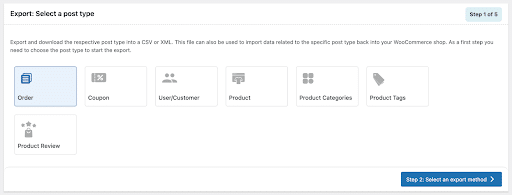
Advanced options are available but kept separate, so beginners aren’t overwhelmed. At the same time, experienced users can access deeper controls when needed.
3. Getting Started for Beginners
For beginners, the learning curve is relatively short. Most users can complete their first import or export within minutes. Features like sample files, auto-mapping of fields, and saved templates make the process even easier.
Overall, the plugin strikes a good balance between simplicity and flexibility, making it suitable for both first-time WooCommerce users and more advanced store managers.
Performance & Support
1. Loading Times and Efficiency
The Import Export Suite is built to handle large volumes of data without slowing down your WooCommerce store. Whether you’re exporting thousands of orders or importing a massive product catalog, the plugin runs efficiently in the background, minimizing impact on your site’s performance.
Processes like field mapping and data validation happen quickly, and progress indicators help you keep track of longer imports or exports. Overall, it delivers reliable performance even for large datasets, which is essential for busy stores.
2. Quality of Documentation
WebToffee provides clear and detailed documentation that guides you through every major task. You’ll find step-by-step guides, screenshots, and explanations for common scenarios like importing products, exporting orders, scheduling tasks, and handling custom fields.
The documentation is easy to navigate and written in straightforward language, which makes it useful whether you’re a beginner setting up your first import or an experienced user configuring advanced filters.
3. Support Responsiveness
Support is included with your annual subscription, and many users find WebToffee’s support team responsive and helpful. Common support channels include ticket-based support via the WebToffee website.
Support staff typically assist with installation questions, troubleshooting specific errors, and clarifying configuration options. Premium users often benefit from faster responses and priority support for more complex issues.
Pricing & Plans
Here’s a clear breakdown of the Import Export Suite for WooCommerce pricing (annual subscription) from the official WebToffee product page.
1. Pricing Tiers
- Single Site – $129/year; Best for single WooCommerce stores.
- Up to 5 Sites – $209/year; Ideal if you manage multiple client stores or multisite setups.
- Up to 25 Sites – $299/year; Good choice for agencies or larger businesses with many stores.
Each plan is billed yearly and includes the plugin license, updates, and access to premium support for the duration of your subscription.
2. Money-Back Guarantee & Support
WebToffee offers a 30-day money-back guarantee, so users can try the plugin risk-free and request a refund if it doesn’t meet their needs.
The subscription also includes one year of updates and support, and users are free to cancel the renewal at any time.
Pros & Cons Of Import Export Suite For WooCommerce
Pros
- Supports almost all WooCommerce data types: Easily import and export products, orders, customers, coupons, reviews, subscriptions, and related metadata from one place.
- Multiple import and export methods: Choose between quick actions, advanced configurations, or saved templates depending on how much control you need.
- Scheduling and FTP automation: Automate recurring imports and exports using FTP or SFTP, which is especially useful for syncing with external systems.
- Bulk update support: Make large-scale changes to prices, inventory, categories, or custom fields during import without manual editing.
- AI-powered product descriptions: Automatically generate product descriptions during import, helping save time when adding or updating large catalogs.
Cons / Limitations
- Advanced features require the premium version: Features like automation, advanced filtering, and AI integration are available only in the paid version.
- Initial learning curve for first-time users: Users new to import/export tools may need some time to understand field mapping and advanced options.
Real-World Use Cases
The true value of an import/export tool becomes clear when you see how it solves real store challenges. Below are common situations where the Import Export Suite for WooCommerce shines:
1. Migrating from Staging to Live Site
When you’re building or redesigning a store, staging sites let you test changes safely. But moving store data from staging to live can be tricky, especially if customers, orders, or products have changed since staging was created.
With this plugin, you can export updated products, customer records, orders, and settings from the staging site and import them into the live site without losing crucial data. It even retains hashed passwords, so customers don’t need to reset their login credentials after migration.
2. Bulk Price Updates for Sales
Imagine planning a site-wide sale. You need to update prices for hundreds or thousands of products. But doing it manually would take hours.
Instead, you can:
- Export your product list
- Adjust prices in bulk using formulas (increase/decrease by percentage or fixed amount)
- Re-import the updated file
This saves time and eliminates manual errors, and it’s especially helpful for seasonal promotions or clearance pricing.
3. Exporting Orders for Accounting or Fulfillment
Many stores need to share order data with third-party systems like accounting tools, fulfillment partners, or shipping platforms.
Rather than copying orders one by one:
- Use the plugin to export orders with custom filters (date range, status, payment method)
- Generate clean files ready for your accountant or fulfillment team
You can include all relevant order metadata, making sure nothing important is missing.
4. Automated Daily Imports from External Systems
Some businesses sync inventory or product feeds from external vendors or ERP systems. Manually importing these files every day can be repetitive and time-consuming.
With scheduling and automation features, you can:
- Set up a daily import via FTP/SFTP
- Let the plugin fetch and process the file at a set time
- Automatically update inventory, prices, or new products without manual intervention
This keeps your store data up-to-date with minimal effort.
5. Customer Data Sync for CRM or Marketing Tools
Keeping customer records updated across tools (like CRMs or email marketing platforms) can be a hassle. Instead of relying on manual exports:
- Export customer lists regularly with the fields your CRM needs
- Import updated contacts back into other systems
- Keep customer segments and mailing lists fresh
This is useful for loyalty programs, targeted campaigns, or customer analytics.
6. Backing Up Key Store Data
Before a major plugin update or theme change, it’s smart to back up critical data like products, orders, and customers. The plugin makes this easy by giving you:
- Filtered exports for specific data types
- Structured files you can keep on your server or cloud storage
- A safety net in case something goes wrong during updates
These examples show how the Import Export Suite can save time, improve accuracy, and streamline workflows, whether you’re managing a small shop or a large WooCommerce catalog.
Import, Export, and Manage WooCommerce Data with Ease!
Final Verdict
The Import Export Suite for WooCommerce is a powerful and versatile solution for anyone who needs real control over WooCommerce data. It’s more than just a simple import/export tool. This all-in-one plugin lets you handle products, orders, customers, coupons, subscriptions, and more, all from one interface.
Whether you’re migrating a site, updating large datasets, automating daily imports/exports, or preparing data for reporting, it delivers both depth and flexibility that go well beyond WooCommerce’s native tools.
Its intuitive UI, scheduling features, and ability to bulk update data make it a solid choice for both beginners and advanced users. The inclusion of unique features like AI-generated product descriptions adds extra value for stores with large catalogs or limited content resources.
How It Fits With Specialized WebToffee Plugins
WebToffee offers a suite of specialized import/export tools in addition to the all-in-one solution. These are available in both free and premium versions and can be better options if your needs are narrower or you want a more focused plugin:
- Product Import Export for WooCommerce – A dedicated plugin for importing and exporting product data – products, attributes, images, categories, and reviews. It’s great if your priority is product catalog management and you don’t need the overhead of handling other data types.
- Order Import Export Plugin for WooCommerce – Focuses specifically on orders, coupons, and subscriptions. If your main requirement is syncing order data with accounting systems, fulfillment partners, or external tools, this plugin offers advanced filtering, scheduling, and bulk update features tailored to order-centric workflows.
- WordPress Users & WooCommerce Customers Import Export – Designed to import/export user accounts and WooCommerce customer data, including roles, metadata, and password retention (so users can log in without resetting credentials after migration). It’s ideal if you frequently move users between sites or sync with a CRM.
Overall Recommendation
- If you want a comprehensive, all-in-one import/export solution that handles every major WooCommerce data type, automates workflows, and gives you deep control over filtering, updating, and scheduling, Import Export Suite for WooCommerce is a strong choice.
- If your needs are more specific, such as only managing product data, order flows, or user/customer records, the specialized WebToffee plugins might be simpler, more focused, and cost-effective.
About the Author: Muskaan Sabarwal