Managing and hosting events is no small feat. Yes, when your events get sold out, there is no better feeling than that! But what about all those people who were eager to attend your event, or what if there are last-minute cancellations? Solution? WordPress Event Management System!
In the past, you just needed a piece of paper and a pen to manage a successful event or maybe a team of specialists and a phone. Today’s events have changed the landscape in terms of complexity. Event managers face numerous difficulties, and one of them is handling limited seats & waitlists.
In A Hurry? Here’s A Brief Summary…
- It was observed that managing events using a digital & automated system to move waitlist attendees into vacant seats is essential.
- In some scenarios, it is advised to set your “open for waitlist” limit to 3 times the available capacity, as 1%-2% waitlisted tickets often fail to confirm.
- A waitlist without proper communication channels is considered to be a “deadlist.”
- Top-performing waitlist strategies have a conversion rate of 10%-15%.
- For free online events, it is recommended to double the number of registrations (i.e., 2000 registrations for 1000 seats) to account for the 50% no-show rates.
- Utilising real-time event-checkins to monitor entries, this allows event organisers to realise waitlist spots.
- 70% customers are most likely to switch to a competitor after just two bad experiences, which can include not attending their desired event.
The event planning waitlist feature looks like ordinary functionality, but in reality, it can make or break your event. It helps event organisers manage demand, communicate with their audience, and make their event even more successful. In this article, we will discuss everything you need to know about waitlists, when to introduce them, their benefits, and how to effectively manage them.
In This Blog, We Will Talk About…
(Jump to the section that interests you the most!)
What Are The Major Issues For Event Organisers?
Limited seats are just one aspect of the major issues. But if you own a WooCommerce-based event business, some issues directly impact your customers’ trust, your revenue, and automation. Without having a WordPress event management system and a reliable WordPress Manager, handling such events can become risky and inefficient in the long run
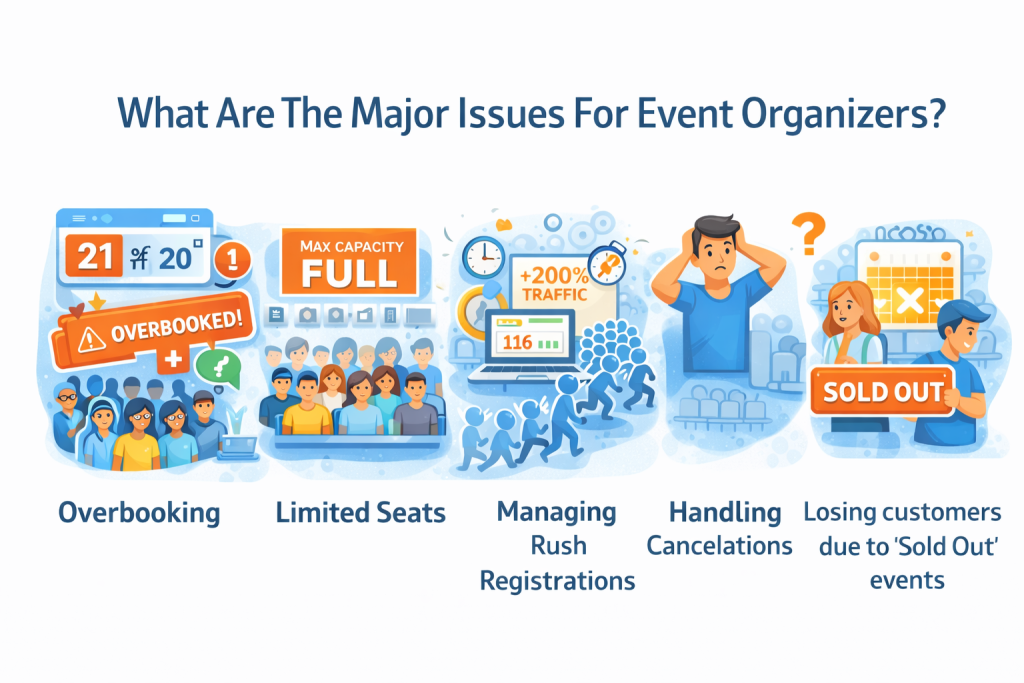
These are some of the major issues faced by WooCommerce-based event management businesses –
1. WooCommerce Doesn’t Handle Complex Event Capacity
Natively, WooCommerce manages stock like products, not events with –
- Per session limit
- Group reservations
- Tiered tickets (Premium, VIP, etc.)
Without a WordPress event management system in place, event organisers often have to rely on manual tracking, which isn’t built to handle issues like limited seats.
2. Risk Of Overbooking
During high-demand registrations, without having a WordPress event management system that monitors real-time event check-ins, organisers delay in updating the number of vacant seats, which results in overbooking.
This leads to –
- Long refund processes
- Brand’s image is going for a toss
- Negative feedback
3. Managing Rush Registrations
This is where most of the event organisers regret not having a WordPress event management system. Popular events often experience such spikes, which leads to:
- Multiple users are trying to book the tickets for the event
- Manual tracking causes inaccurate seat allocation
- Inventory Management lagging
Rush registration gives event organisers a strong reality check, exposing their weaknesses.
4. Handling Cancellations
Another issue that event organisers face daily is Cancellations.
It is important to understand that cancellations are inevitable. There are ample reasons for the same. The issue is not cancellations; the major issue is how it is handled. WordPress event management systems automatically handle cancellations like a pro, but if cancellations are not handled automatically –
- Seats remain vacant
- Staff overload increases
- Revenue & Profit decrease
It is important to have a structured workflow where, if there is a cancellation –
- The cancelled seat returns to the inventory
- Update instantly regarding a new availability, or
- The waitlist attendee is notified
5. Losing Customers Due To “Sold Out” Events
As we discussed earlier, 70% of customers are most likely to switch to a competitor after just two bad experiences, which can include not attending their desired event. How can event planners solve this problem? Including the “Waitlist” mechanism. WordPress event management system has this functionality that comes in handy.
Without the Waitlist mechanism –
- High-intent traffic is lost
- Future remarketing opportunities weaken
- Last-minute cancellations affect revenue
A structured WordPress event management system transforms demand into a waitlist pipeline, saving lost revenue.
6 Major Event Issues Fixed With WordPress Event Management
Events continue to grow in size, complexity, and frequency. Managing such events with just a pen and paper or with a couple of specialists is not enough. You need a system that not only automates all the bookings for the event but also streamlines the process for the event managers.
Enters WordPress Event Management System.
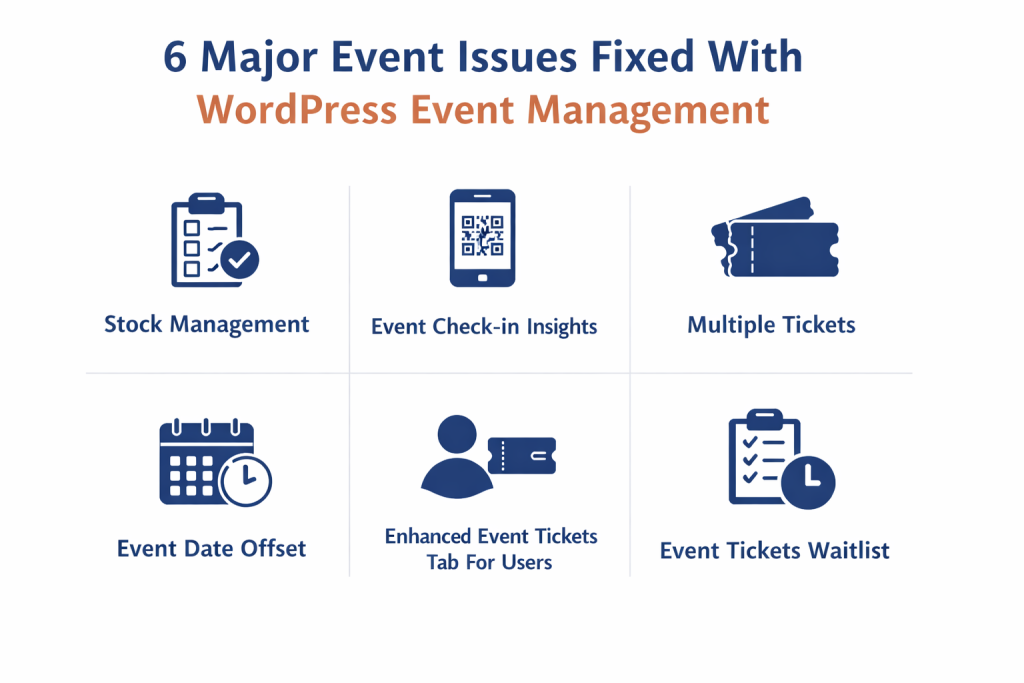
This event management system not only streamlines the process for event managers but also enables them to deliver an exceptional experience for their customers. Ultimately, events are all about the experience.
Let us see how the WordPress event management system fixes the major issues faced by event planners –
1. Stock Management
This functionality allows event managers set a specific limit for the tickets available for the event. Once the limit has been reached, WooCommerce automatically stops the ticket sales. This functionality helps with the issue of overbooking. When the organisers manually track the ticket sales, they suffer revenue losses. This ensures seat availability is recorded in real-time.
2. Event Check-in Insights
This feature of WordPress event management allows event planners to display the total number of attendees who have checked in for each event, both on the event listing page (frontend) and within the event planner’s dashboard (backend), using a filter. This helps them keep track of the customers who have checked in and to analyse the no-show rates.
3. Multiple Tickets
Event planners list can introduce multiple tickets for different user types (eg, adult, teenager, or child) with separate pricing for each. You can allocate seats to different user types. You can utilise the same functionality to introduce tickets for different categories (eg, VIP, Gold, or Premium) with separate pricing for each.
4. Event Date Offset
This functionality of the WordPress event management allows you to set a buffer period before and after the event begins. This is useful for accommodating setup or wrap-up time for admins, offering early access, or providing a grace period around the official event duration. This helps manage rush registrations.
5. Enhanced Event Tickets Tab For Users
As we mentioned earlier, it is essential to provide your customers with an experience that they never forget. The Events tickets tab improves the user experience while booking events on your platform. Customers can view all past and future events, transfer tickets, and view/download PDF tickets. The elements of the event tickets dashboard are also dynamic. The admin can also change the colour for the event listing page to match the colour of the event dashboard. This will help you maintain uniformity across your online event store.
6. Event Tickets Waitlist
This functionality of WordPress event management enables organizers to do the following: When a customer “requests cancellation” for a waitlist ticket, the admin will accept/reject it. If the admin accepts it, the system automatically accepts the oldest waiting ticket for the same event, and confirms it, notifying the customer via email. Still confused? Don’t worry, this feature is the highlight of this blog. We will cover this in-depth in the coming sections.
Want To Get Access To These Features?
How The Waitlist Mechanism Works & Saves Revenue?
The waitlist mechanism can be confusing, but consider today your lucky day, because we have a real scenario to make you grasp the concept easily.
Scenario: A Yoga Studio with 20 seats.
Imagine you own a yoga studio. You are hosting a weekend wellness workshop that has only 20 seats available.
The best-case scenario event sells out within seconds of the tickets going live. Normally, this is where the revenue stops. But about last-minute cancellations? What if someone cancels at the last minute because of some unforeseeable emergency?
Without an event planning waitlist mechanism –
- Cancelled seat stays vacant,
- Interested customers see the “sold out” message, and never get a chance, and
- The studio loses revenue and even an interested potential customer.
By incorporating the Waitlist mechanism, you can automate the entire process and safeguard your revenue.
Let’s understand how this works utilizing the WordPress event management system –
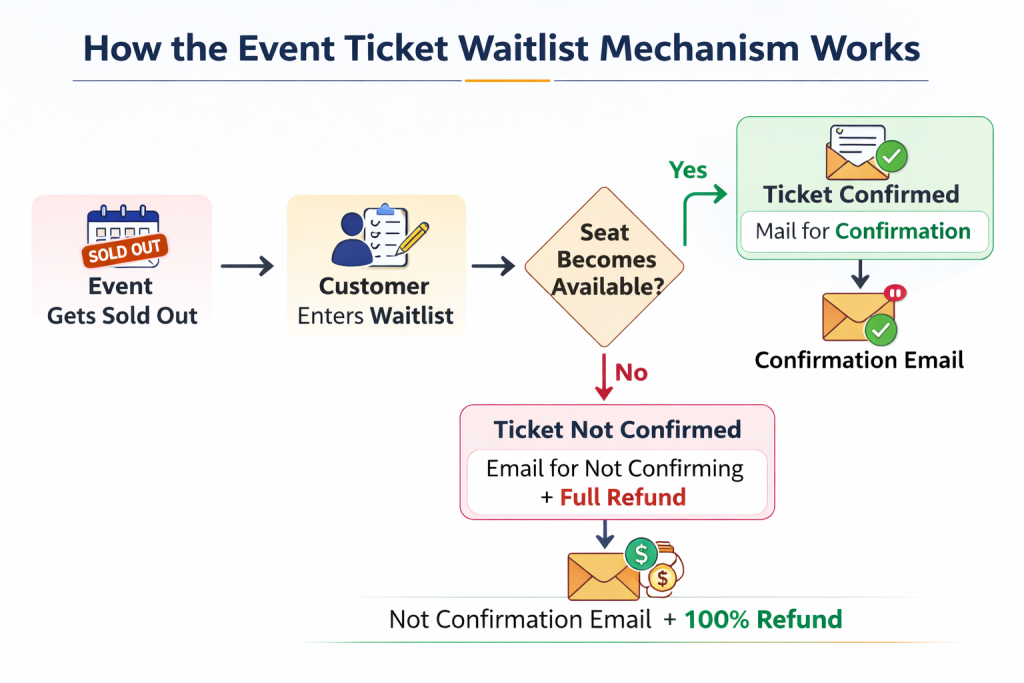
1. The Weekend Wellness Workshop Sells Out
All 20 seats sell out for the weekend wellness workshop. Instead of showing a dead-end “Sold out” message, customers can join a “waitlist”.
2. Customer Joins the Waitlist
The interested customer joins the waitlist by entering the required details and completing the payment. This functionality of the WordPress plugin for event management keeps the demand captured instead of lost.
3. Cancellations Occur
When a cancellation occurs, the WordPress event management system automatically checks for the next person in the waitlist queue.
4. Confirmation Process
Now there are two scenarios here –
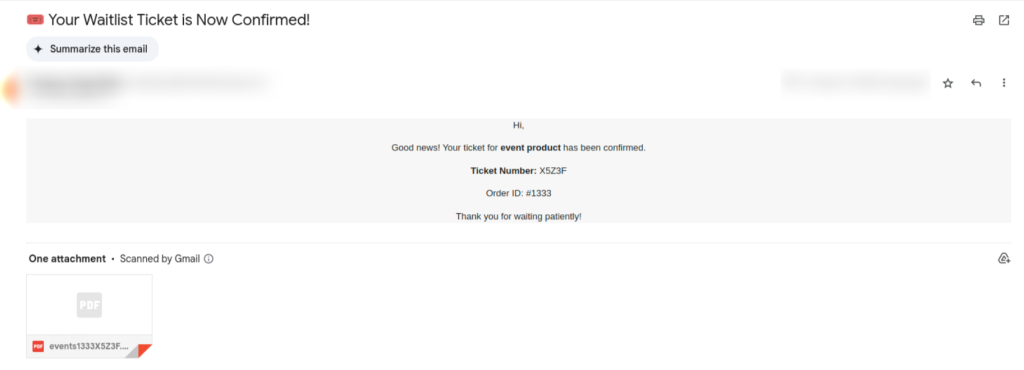
If the waitlist ticket is confirmed, the customer will receive an email stating their waitlist ticket has been secured –
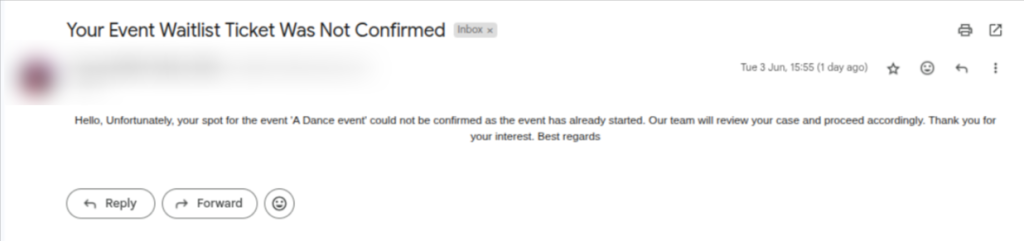
If the event has already started and the waiting list ticket for the event is still not confirmed, customers will receive this email (Note: in this scenario, the customer will get a full refund for the purchase of the waiting list ticket) –
How does this save revenue? Event planning waitlist functionality –
- Reassigns the cancelled seats within seconds
- Captures the demand, interested customers get to book the tickets
- Clear communication via email protects customers’ trust
- Automated refunds and confirmations eliminate manual administration work.
For running multiple sessions in a yoga studio, an event planning waitlist mechanism is your sidekick through thick and thin. Automated digital invitations ensure that potential attendees receive instant updates as spots open up during the registration period
Event Management System vs Manual Tracking?
If you are an event organizer who still feels that manual handling for events is cheaper and more convenient. This final section is specially curated for you!
Here we will showcase a comparison chart that’ll help you understand the differences between the WordPress event management system and manual tracking.

If you are looking for a reliable and professional execution for your events, the WordPress Event Management system is a strategically superior option. There are free versions readily available in the market if you feel cost will be an issue. Manual tracking is only viable in cases of low-quality and less complex events.
This WooCommerce Event Tickets Plugin Is Your One-Stop Solution!
About the Author: Muskaan Sabarwal