For the last couple of years, the event industry has faced a major setback. And there is one term that we have heard repeatedly: hybrid events platform. What is it all about?
The definition seems straightforward: a hybrid event combines in-person and digital elements, customised to each audience for optimal attendee experiences. Each aspect of hosting an event on a hybrid events platform, whether virtual or in-person, should be specifically designed to meet the expectations of each audience, to drive engagement and exploration.
Lucky for event organisers, today’s technology advancements have made it much easier to host hybrid events.
Key Takeaways:
- About 75% of event professionals feel that hybrid events are here to stay.
- 52% of them reported that hybrid events give them the flexibility and potentially reduce the need for travel.
- 20% of organisers prefer hybrid events to other formats.
- 15% of events that are happening in 2026 are hybrid.
- 6 out of 10 associates expect hybrid and virtual formats to continue being a significant part of events.
- 89% of individuals who use event technology save around 200 hours per year.
- 60% of associates say they’ll adapt to online or hybrid formats for major events in 2026.
- Ninety-seven per cent of event professionals foresee hybrid events becoming a vital component of the events industry in the future.
Still don’t understand this concept? Let us explain this with a real-life example; have you ever cheered for a Super Bowl match at home or watched the nail-biting Academy Awards? If the answer is yes, then you have attended a hybrid event. Yes, it can be that simple.
If you come across a reliable hybrid events platform, hosting such events will be a breeze. Now, that’s not to say your event should be of the same scale as the Super Bowl (you and your budget just breathe a sigh of relief!)
We will now discuss the requirements of a hybrid event, how to set up your own hybrid event, the workflow, and more…
In This Blog, We Will Talk About…
(Jump to the section that interests you the most!)
What You Need to Run Hybrid Events In WooCommerce/WordPress?
Hybrid events carry the strength of both in-person and virtual events. It not only allows participants to attend virtually through new age technology advancements, but also at the venue where the event is actually taking place. It gives your events global exposure as attendees from different parts of the world can join virtually through a hybrid events platform.
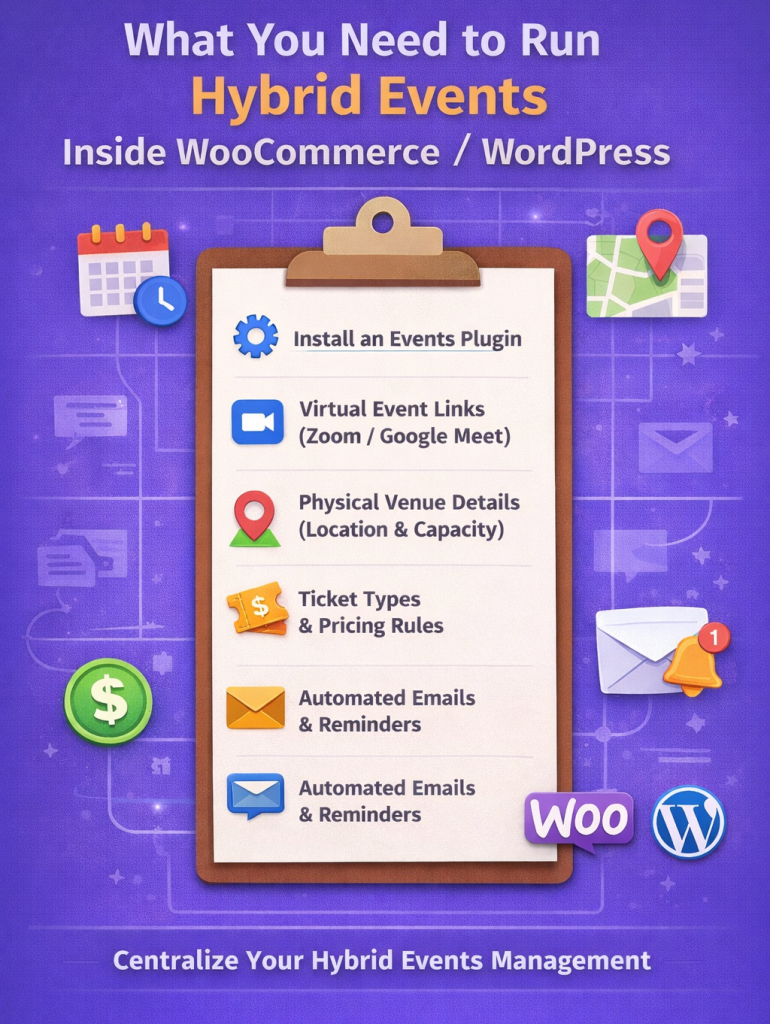
This might seem complicated, but trust us, it is not as twisted as it seems. Here is a quick checklist to refer to when you feel stuck or lost –
Now that we are back on track, let’s resume understanding the requirements for running a hybrid event in WooCommerce/WordPress.
1. Hybrid Events Platform
Running a hybrid event means considering two distinct audiences: those watching on the screen and those in the room. You need a plugin that is compatible with WooCommerce and WordPress, and extends its functionality beyond checkout and products to handle requirements such as tickets, venue, attendee details, and schedules without custom plugin development.
By utilising Event Tickets Manager for WooCommerce, you can seamlessly switch between both. The WooCommerce events plugin is the perfect hybrid event platform for hosting such events.
2. Virtual Events Details
Having a correct hybrid events platform allows you to provide your online attendees with the following details –
- Zoom or Google Meet Links
- Secure delivery of access details of the event
- Automated SMS reminders with Zoom live event links
3. Venue Details For Offline Attendees
Hosting events on a hybrid events platform means you need to be prepared for offline attendees as well, i.e., individuals who are attending the event at the venue –
- Google Maps Integration to display the accurate address
- PDF tickets along with the details related to the event
- QR Scanners for easy check-ins
- Display multiple event locations
- Barcode Scanning for hosting hybrid events
4. Dynamic Ticket Types & Pricing Rules
Hosting hybrid events means setting up dynamic pricing rules and customizable tickets. Your hybrid events platform should support –
- Fully customizable PDF event tickets
- Setting price for a specific user type
- Time-based pricing for attendees
- Tiered ticket kinds – VIP, Premium, or General
5. Automated Email & SMS Reminders
Manual communication with attendees causes a lot of hassle for the management. This is another functionality that the hybrid events platform should have –
- Emails for order confirmation, along with PDF tickets for offline events, and Zoom virtual event links for online events
- Pre-event reminders via email, SMS, or WhatsApp text messages
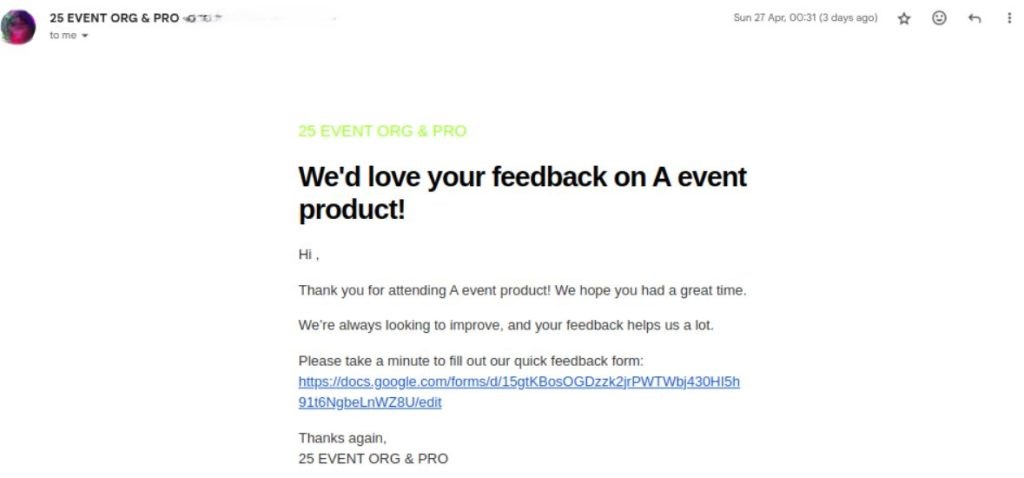
- Post-event feedback after successful hybrid events
Automation reduces manual work and makes hosting hybrid events easy for the event management team.
When all the mentioned elements come under one centralised umbrella of WooCommerce/WordPress in the form of a hybrid events platform, hosting successful hybrid events becomes streamlined.
How To Set Up a Hybrid Events Platform In WooCommerce?
Now that you are well acquainted with the requirements of hosting hybrid events, we can proceed with the setup.
Before we set up a hybrid events platform, it is important to note –
- WordPress Website: You’ll need a self-hosted WordPress Site
- WooCommerce: This open-source, free plugin can transform any ordinary WordPress site into a functional eCommerce platform, with core functionalities such as carts, products, and checkouts.
Once you have these two in place, the actual magic begins with the addition of a correct hybrid events platform.
Here’s how to host successful hybrid events utilising Event Tickets Manager for WooCommerce –
How Successful Hybrid Events Work?
Successful hybrid events work by taking a centralised approach, where all the tasks are aligned one after the other. Still confused? For the virtual side of the event, running noise cancelling software during the live stream keeps background sound from remote co-hosts or presenters from distracting attendees watching the same feed.
Imagine you are a fitness trainer who wants to organise a hybrid event, “Weekend Mobility Workshop.”
- Offline Event for the attendees in the studio
- Online Event via GMeet or Zoom for remote attendees.
Step 1: Event Creation Over the Hybrid Events Platform
The fitness trainer can easily create the event under their WooCommerce store. We have just discussed the steps for the setup in the previous section.
- Specify the start date and time of the event.
- A What Time Was It tool can help organisers review past event timings and confirm when earlier sessions were scheduled before planning future hybrid events.
- Specify the date and time when the event ends.
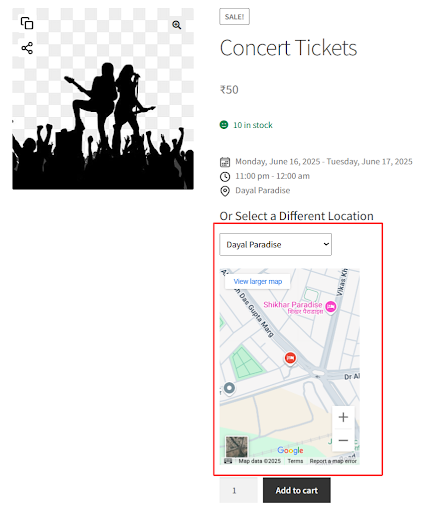
- Mention the accurate address of the event to get the best Google map results.
- Display the location of your event on Google Maps on the product page. Something similar to this,
- Integrate Google Meet to share the links via email
- Integrate Zoom to share the Zoom live event link
- Automate settings for sending out reminder emails & SMSs, and collect post-event feedback via emails.
Step 2: Ticket Configuration
You can easily customise the look and feel of your event tickets by configuring the settings of the hybrid events platform. These are some important points to note –
- Mention the content for the event ticket subject and body that the attendees will receive via Email
- Upload your default logo, in this case, the logo of your fitness studio
- The key is make it as personalised as you can, so select the colour of the background and text colour.
- If you also want to send confirmations via SMS, specify the content for that as well.
- Many hybrid event platforms have pre-defined templates for the PDF tickets. Event managers can utilise those.
Step 3: Purchase & Registration
After successfully creating the event and configuring all the settings. It is THE DAY!
The customers will see your Weekend Mobility Workshop, and –
- Purchase their preferred ticket type
- Complete their checkout using the payment methods that the hybrid events platform supports.
After the final purchase –
- Online attendees will get the joining virtual Zoom event links or Gmeet links via emails
- Offline attendees will receive their PDF Tickets in their dashboard with QR or Barcode scanners for easy check-in.
- Event organizers managing high-volume check-ins can streamline this process by equipping staff with professional handheld barcode scanner devices that rapidly validate tickets, track attendance in real-time, and integrate with event management systems, significantly reducing entry bottlenecks at venue doors.
STEP 4: Pre-Event Reminders
Now the settings that you have configured earlier for the automatic email reminders will come into play –
- 1st email – Order confirmation of the successful purchase of tickets for the Weekend Mobility Workshop.
- 2nd email – A reminder 3 days before the event begins via Email or SMS
Offline attendees will also receive the same reminder emails.
STEP 5: Weekend Mobility Workshop DAY!
On the event day –
- The online attendees join the workshop using the Zoom or Gmeet links
- The offline attendees scan their QR or barcode at the venue and attend the event
- The trainer successfully delivers the session to both by utilising the hybrid events platform.
STEP 6 – Post-Event Follow-up
After successfully hosting the Weekend Mobility Workshop at the hybrid events platform, it is also crucial to understand the feedback of the attendees –
- All attendees (offline and online) receive a Google Form via email for the feedback
- Attendees can also get a one-time gift card if the hybrid events platform that you are using allows it. This turns a one-time event into a long-term membership.
They will receive something similar to this –
Now, you might be wondering why this example and this workflow matter. The answer is simple – when you host a hybrid event, it can become very overwhelming and complex at the same time.
When you use plugins like Event Tickets Manager for WooCommerce to support your hybrid events platform, this workflow is exactly how your successful hybrid events are planned, sold, executed, and managed.
From creating customised tickets to match your brand, to collecting post-event feedback. This hybrid event software is like your best friend in the event management industry. The plugin ensures that you focus on delivering a seamless experience for both your online and offline attendees.
Must-Have Features In A WooCommerce Hybrid Event System
We are about to wrap up the blog, but before we do so, here are some of the must-have features to look for while choosing a hybrid events platform.
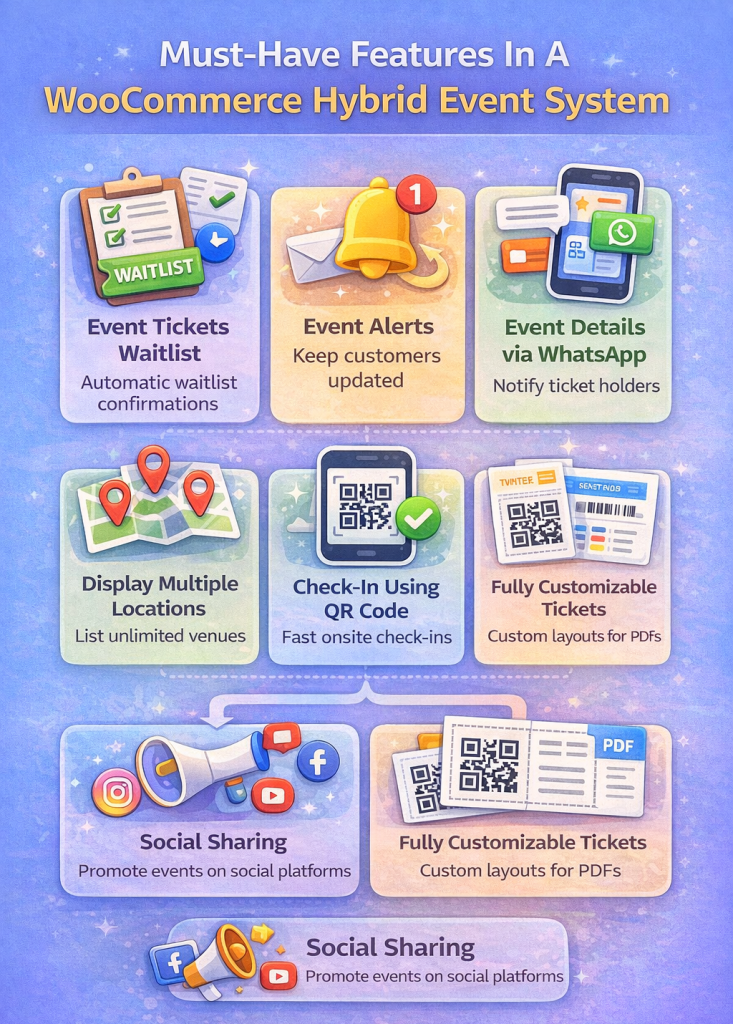
Events Tickets Manager for WooCommerce Pro is the first choice for event management professionals because it simplifies the process for merchants to customise and generate event tickets, offering a variety of layouts. It enables the seamless delivery of tickets to customers via email, introduces a new product category to the store, and facilitates the quick addition of events by merchants.
1. Event Tickets Waitlist
This functionality of the WooCommerce events plugin allows event professionals to do the following: When an attendee “requests cancellation” for a waitlist ticket, they will accept/reject it. If the admin accepts it, the system automatically accepts the oldest waiting ticket for the same event, and confirms it, notifying the customer via email.
2. Stay Updated via Event Alerts
Keep your customers updated with event alerts. Event professionals can notify them about upcoming events using the “Subscribe” button.
3. Event Details via WhatsApp
Utilise this WhatsApp integration to send the event details directly to the customers via WhatsApp, ensuring they stay up-to-date.
4. Display Multiple Locations
Display multiple locations for a single event. There is no limit on the locations; you can list as many locations as you like.
5. Check-In Using QR Code
Experience a seamless check-in by implementing a QR Code for events. Attendees can scan the QR Code generated on the event ticket received in PDF format via email, and click on the link produced by the QR Code for effortless check-in. It’s worth paying attention here, because even small issues like a QR code not loading can affect the check-in experience if everything isn’t properly tested in advance. To ensure smooth check-in, consider using a free QR code generator that offers reliable and quick creation of codes tailored for your event.
6. Fully Customizable Tickets
Explore the flexibility of fully customizable PDF tickets with a range of layout options already provided for WooCommerce events. Users can tailor these layouts to their preferences, as the events calendar plugin empowers them to craft event tickets according to their unique specifications.
7. Multiple Layout Options For Ticket PDFs
Benefit from the variety of layout choices available for ticket PDFs within the WooCommerce events plugin. Users have the freedom to pick from multiple layout options during the creation and management of events, offering organisers flexibility and customisation capabilities.
8. Social Sharing
Promote your events on social media platforms, attracting traffic and building an audience for your event. This, in turn, contributes to income generation.
Want To Get Access To These Features?
Over To You!!!
Hybrid events have come a long way, and in 2026, they will not just bridge the gap between online and offline events but shape an experience that is flexible, accessible, and engaging for attendees who want to connect from across the globe.
From the organiser’s perspective, hosting a successful hybrid event means lower cost and wider reach. And, if you power your hybrid events platform with tools like Event Tickets Manager for WooCommerce, running such an event is not that complicated.
Host A Successful Hybrid Event Today!
Frequently Asked Questions (FAQs)
1. What is a hybrid events platform in WooCommerce?
A hybrid events platform in WooCommerce allows you to manage both online and offline events from a single event management system, including registrations, ticket sales, capacity limits, and attendee communication.
2. Can WooCommerce handle both virtual and in-person events together?
Yes. With the right event management system for WooCommerce, you can sell tickets for virtual events (Zoom, Google Meet) and physical events (venues, workshops, conferences) under one unified checkout flow.
3. Which plugins are best for creating a hybrid events platform in WooCommerce?
WooCommerce does not support events natively, but event management plugins enable features like ticket booking, scheduling, attendee limits, QR check-ins, and automated emails—without custom development.
4. How do I sell tickets for online and offline events in WooCommerce?
You can create events as WooCommerce products, assign virtual access links or physical venue details, and use an event management system to automate ticket generation, confirmation emails, and attendee tracking.
5. Is WooCommerce suitable for large-scale hybrid conferences?
Yes. In 2026, many organisers use WooCommerce for large hybrid conferences, using advanced event management systems to handle tiered pricing, VIP seating, capacity rules, and real-time attendee data.
About the Author: Muskaan Sabarwal